Showing posts with label fun and cool tricks. Show all posts

Saturday, December 29, 2012

Happy New Year Facebook chat codes

Wish all of you  a very Happy and Prosper New Year. 
Below are some cool Facebook chat codes to say Happy new year to them on FB :)

1.
 [[348175178622169]] [[348175175288836]] [[348175171955503]] [[348175168622170]] [[348175165288837]] [[348175275288826]]
[[348175268622160]] [[348175261955494]] [[348175271955493]] [[348175265288827]] [[348175381955482]] [[348175371955483]]
[[348175375288816]] [[348175378622149]] [[348175368622150]] [[348175475288806]] [[348175465288807]] [[348175471955473]]
[[348175468622140]] [[348175478622139]] [[348175551955465]] [[348175555288798]] [[348175561955464]] [[348175548622132]]
[[348175558622131]] [[348175648622122]] [[348175651955455]] [[348175655288788]] [[348175641955456]] [[348175645288789]]
2.
 [[228970750573428]] [[228970747240095]] [[228970740573429]] [[228970743906762]] [[228970737240096]] [[228970823906754]]
[[228970833906753]] [[228970830573420]] [[228970820573421]] [[228970827240087]] [[228970953906741]] [[228970967240073]]
[[228970963906740]] [[228970957240074]] [[228970960573407]] [[228971053906731]] [[228971057240064]] [[228971047240065]]
[[228971043906732]] [[228971050573398]] [[228971143906722]] [[228971153906721]] [[228971150573388]] [[228971147240055]]
[[228971140573389]] [[228971260573377]] [[228971250573378]] [[228971253906711]] [[228971257240044]] [[228971263906710]]

3.

[[322188301217545]] [[322188304550878]] [[322188311217544]] [[322188307884211]] [[322188314550877]] [[322188531217522]]
[[322188537884188]] [[322188527884189]] [[322188521217523]] [[322188524550856]] [[322188697884172]] [[322188704550838]]
[[322188691217506]] [[322188694550839]] [[322188701217505]] [[322188861217489]] [[322188871217488]] [[322188867884155]]
[[322188857884156]] [[322188864550822]] [[322188954550813]] [[322188951217480]] [[322188947884147]] [[322188944550814]]


4.

[[348187205287633]] [[348187198620967]] [[348187208620966]] [[348187201954300]] [[348187211954299]] [[348187288620958]]
[[348187298620957]] [[348187291954291]] [[348187285287625]] [[348187295287624]] [[348187425287611]] [[348187441954276]]
[[348187448620942]] [[348187428620944]] [[348187458620941]] [[348187685287585]] [[348187671954253]] [[348187695287584]]
[[348187675287586]] [[348187668620920]] [[348187938620893]] [[348187941954226]] [[348187935287560]] [[348187931954227]]
[[348187928620894]] [[348188201954200]] [[348188195287534]] [[348188198620867]] [[348188211954199]] [[348188208620866]]


5.
 
[[228981703905666]] [[228981707238999]] [[228981710572332]] [[228981713905665]] [[228981700572333]] [[228981783905658]]
[[228981787238991]] [[228981780572325]] [[228981790572324]] [[228981793905657]] [[228981890572314]] [[228981893905647]]
[[228981883905648]] [[228981887238981]] [[228981897238980]] [[228981973905639]] [[228981983905638]] [[228981977238972]]
[[228981980572305]] [[228981987238971]] [[228982070572296]] [[228982080572295]] [[228982073905629]] [[228982083905628]]
[[228982077238962]] [[228982170572286]] [[228982167238953]] [[228982173905619]] [[228982160572287]] [[228982163905620]]


To create your own chat codes click here

Saturday, December 15, 2012

How to create facebook Chat codes

Have you seen People sending Smiles and images that are not part of Facebook Traditional chat codes.
Here in this post You will see how easy it is to create these codes and Impress you Facebook friends
Like, The best part is you can create your Unique codes . You can create codes of any image stored in you computer, by following these steps

Follow these Steps :- 
1. Go to Smileyti

2. Click on "Browse" and select The  picture you want to use in facebook chat.

3. Enter captcha code.[If you get one]

4. Click on "Upload Now" .

5. It will generate code in few seconds in This form<< [[512585645451273]] [[512585638784607]] >>
Copy The code
   
6. Paste it in facebook chat and hit enter.
 DONE :D


Friday, August 17, 2012

8 ways to access blocked websites

1. Using IP instead of URL

2. Redirection with short URL service

3. Google cache

Search engines like Google and Yahoo cache webpages and these cached pages are stored in search engines themselves, which likely will be added to the blocked list. Click on the ‘cache’ will bring you to a cache version of the page, as updated as how Google caches it.

4. Internet Archive – Wayback Machine

Wayback Machine is a internet service that periodically keeps a copy of almost all websites in the Internet way from the date they’re started. Clicking on the latest copy of what Wayback Machine have should be somewhat similar to the real site.

5. Anonymous surfing

- Hidemyass.com
- anonymizer.com
- wujie.net
- ultrareach.net


6. Use Proxy in Browsers

7. Bypass with translation services

Use Google translate. Open Google translate ,type the URL and translate page.

8. Retrieve web pages via Email

Web2Mail is a free service that sends websites you want to read right into your inbox. All you need to do is send an email to www@web2mail.com with the URL as subject title.

Friday, April 6, 2012

Facebook chat some coolest codes

SOME OF THESE CODES MIGHT NOT WORK IF YOU WANT TO CREATE YOUR OWN CODES CLICK HERE


TRY THESE CODES

Copy the codes and paste it on your chat !!! ♥♥♥


Merry Christmas 


[[339494426156911]] [[339494432823577]] [[339494429490244]] [[339494436156910]] [[339494422823578]] [[339494506156903]]
[[339494502823570]] [[339494512823569]] [[339494516156902]] [[339494509490236]] [[339494592823561]] [[339494582823562]]
[[339494586156895]] [[339494596156894]] [[339494589490228]] [[339494682823552]] [[339494679490219]] [[339494676156886]]
[[339494669490220]] [[339494672823553]] [[339494769490210]] [[339494762823544]] [[339494756156878]] [[339494766156877]]
[[339494759490211]] [[339494842823536]] [[339494852823535]] [[339494846156869]] [[339494839490203]] [[339494849490202]]


 Large Pink Double ( triple ) heart code


[[379320338758329]] [[379320355424994]] [[379320348758328]] [[379320352091661]] [[379320345424995]] [[379320455424984]]
[[379320448758318]] [[379320452091651]] [[379320445424985]] [[379320442091652]] [[379320525424977]] [[379320518758311]]
[[379320512091645]] [[379320522091644]] [[379320515424978]] [[379320602091636]] [[379320612091635]] [[379320605424969]]
[[379320598758303]] [[379320608758302]] [[379320702091626]] [[379320705424959]] [[379320692091627]] [[379320695424960]]
[[379320698758293]] [[379320778758285]] [[379320775424952]] [[379320788758284]] [[379320785424951]] [[379320782091618]]
[[379320872091609]] [[379320875424942]] [[379320865424943]] [[379320862091610]] [[379320868758276]] [[379320945424935]]


2. Mr. Bean


[[255016264574238]] [[255016271240904]] [[255016277907570]]
[[255016267907571]] [[255016274574237]] [[255016384574226]]
[[255016387907559]] [[255016394574225]] [[255016401240891]]
[[255016391240892]] [[255016464574218]] [[255016454574219]]
[[255016457907552]] [[255016461240885]] [[255016451240886]]
[[255016537907544]] [[255016531240878]] [[255016534574211]]
[[255016541240877]] [[255016527907545]] [[255016634574201]]


3. Jack Sparrow


[[298356520217565]] [[298356516884232]] [[298356506884233]] [[298356510217566]]
[[298356513550899]] [[298356620217555]] [[298356606884223]] [[298356616884222]]
[[298356610217556]] [[298356613550889]] [[298356673550883]] [[298356676884216]]
[[298356666884217]] [[298356680217549]] [[298356670217550]] [[298356740217543]]
[[298356733550877]] [[298356743550876]] [[298356730217544]] [[298356736884210]]
[[298356823550868]] [[298356810217536]] [[298356820217535]] [[298356826884201]]
[[298356813550869]] [[298356906884193]] [[298356896884194]] [[298356900217527]]
[[298356903550860]] [[298356893550861]] [[298356950217522]] [[298356946884189]]

4. Superman


[[299528860107644]] [[299528863440977]] [[299528866774310]] [[299528856774311]]
[[299528870107643]] [[299528950107635]] [[299528943440969]] [[299528946774302]]
[[299528953440968]] [[299528956774301]] [[299529013440962]] [[299529016774295]]
[[299529010107629]] [[299529003440963]] [[299529006774296]] [[299529060107624]]
[[299529063440957]] [[299529066774290]] [[299529070107623]] [[299529073440956]]
[[299529173440946]] [[299529183440945]] [[299529180107612]] [[299529176774279]]
[[299529186774278]] [[299529243440939]] [[299529236774273]] [[299529240107606]]

5. Elmo


[[302117289844540]] [[302117283177874]] [[302117276511208]] [[302117279844541]] [[302117286511207]] [[302117366511199]]
[[302117369844532]] [[302117373177865]] [[302117383177864]] [[302117379844531]] [[302117426511193]] [[302117436511192]]
[[302117429844526]] [[302117423177860]] [[302117433177859]] [[302117523177850]] [[302117529844516]] [[302117526511183]]
[[302117536511182]] [[302117533177849]] [[302117606511175]] [[302117596511176]] [[302117599844509]] [[302117593177843]]
[[302117603177842]] [[302117646511171]] [[302117649844504]] [[302117659844503]] [[302117656511170]] [[302117653177837]]
[[302117706511165]] [[302117703177832]] [[302117699844499]] [[302117709844498]] [[302117696511166]] [[302117749844494]]

6. Troll face


[[242538225822042]] [[242538222488709]] [[242538232488708]] [[242538219155376]] [[242538229155375]] [[242538339155364]]
[[242538335822031]] [[242538342488697]] [[242538345822030]] [[242538349155363]] [[242538392488692]] [[242538395822025]]
[[242538399155358]] [[242538402488691]] [[242538405822024]] [[242538475822017]] [[242538472488684]] [[242538489155349]]
[[242538492488682]] [[242538485822016]] [[242538562488675]] [[242538565822008]] [[242538569155341]] [[242538575822007]]
[[242538572488674]] [[242538612488670]] [[242538625822002]] [[242538619155336]] [[242538622488669]] [[242538615822003]]
[[242538675821997]] [[242538682488663]] [[242538672488664]] [[242538679155330]] [[242538685821996]] [[242538742488657]]


7.Mask


[[255006724575192]] [[25500672
7908525]] [[255006737908524]] [[255006734575191]] [[255006731241858]]
[[255006827908515]] [[255006831241848]] [[255006824575182]] [[255006817908516]] [[255006821241849]]
[[255006874575177]] [[255006871241844]] [[255006884575176]] [[255006877908510]] [[255006881241843]]
[[255006934575171]] [[255006931241838]] [[255006941241837]] [[255006944575170]] [[255006937908504]]
[[255007004575164]] [[255007001241831]] [[255006994575165]] [[255006997908498]] [[255006991241832]]
[[255007084575156]] [[255007101241821]] [[255007077908490]] [[255007091241822]] [[255007081241823]]

NOTE:-
IF these codes are not working Properly please visit our Facebook page and copy these codes from there .


Wednesday, March 14, 2012

Facebook all latest cool chat emotions with codes

Gone the days when Facebook  chat emotions are limited to only few emotions now days there's a lots of stuff you can do on facebook chat . Like How to use colorful text / words / alphabets in facebook chat  or How to add your friends profile pic in facebook chat  Now Take a look at the total new form of facebook chat emotions with all the codes .


[[f9.laugh]] 
[[f9.sad]] 
[[f9.angry]] 
[[f9.sleepy]] 
[[f9.shock]] 
[[f9.kiss]] 
[[f9.inlove]] 
[[f9.pizza]] 
[[f9.coffee]] 
[[f9.rain]] 
[[f9.bomb]] 
[[f9.sun]] 
[[f9.heart]] 
[[f9.heartbreak]] 
[[f9.doctor]] 
[[f9.ghost]] 
[[f9.brb]] 
[[f9.wine]] 
[[f9.gift]] 
[[f9.adore]] 
[[f9.angel]] 
[[f9.baloons]] 
[[f9.bowl]] 
[[f9.cake]] 
[[f9.callme]] 
[[f9.clap]] 
[[f9.confused]] 
[[f9.curllip]] 
[[f9.devilface]] 
[[f9.lying]] 
[[f9.rofl]] 
[[f9.billiard]] 
[[f9.cakepiece]] 
[[f9.rosedown]] 
[[f9.shutmouth]] 
[[f9.shy]] 
[[f9.silly]] 
[[f9.tongue1]] 
[[f9.fastfood]] 
[[f9.ring]] 
[[f9.plate]] 
[[f9.candle]] 
[[f9.party]]

How to use these codes ..? 
Just simply copy them from above [ctrl-c] and paste[ctrl-v] them in your chat window

Sunday, February 26, 2012

how to create standout best facebook timeline cover


Most of facebook user's now have facebook timeline profile some likes it some don't but the fact is we all have to leave with it. Personally i like Facebook timeline it changed the experience of profile now your profile really express you. and the best thing about timeline is it gives you option to select a COVER cover to your timeline. Timeline cover is a stand out feature. It gives you opportunity to express your personality.

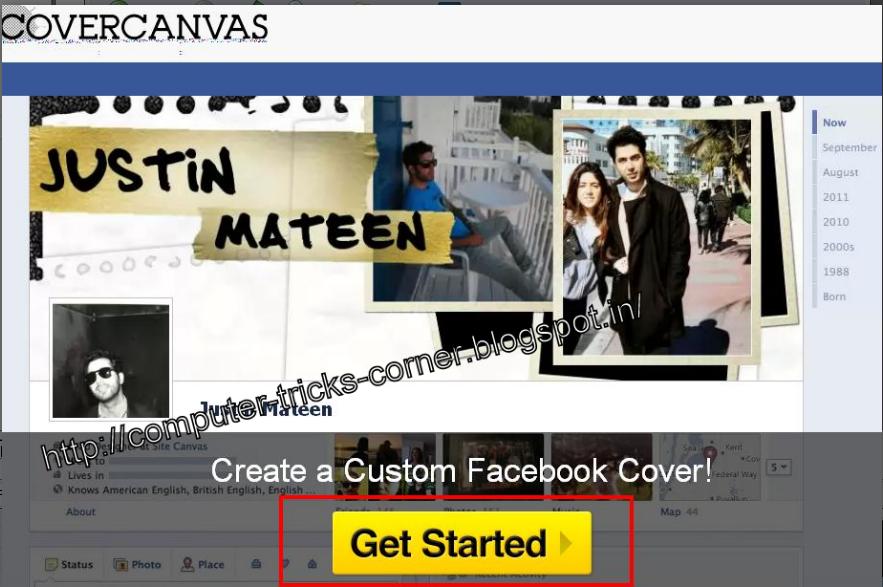
So In this post we will discuss about how one can create a standout, cool and best timeline covers with a cool facebook app Cover Canvas with just one click.


  • Just Login to your facebook account 
  • then goto Cover Canvas and click on Get Started
  • Click on Allow 
  • Now choose a cover you like.
  • And click on Make My Cover
  • Now goto your facebook timeline and change your timeline cover 


Thursday, January 26, 2012

how to access facebook through google plus or Add the Facebook Stream to your Google+ Profile


Do you want to access Google plus and facebook under the same tab on same page.? ??
then surely this post will help you to add your facebook account to google plus and get all the Facebook stream to Google plus. all you have to do is install a plugin which will only gonna take less then 2minutes


How to access Facebook through Google plus:-


  • Visit  here and Download .GOOGLE+FACEBOOK browser extension and install it(only gonna take less then 2min)
  • Now login to your Google plus account   
  • You will see a Facebook button on top (see in image ) click on  button [button no. 1. in image]
  • and then click on  " f Connect with Facebook " (see in image [button no. 2.])


  • Now click on Allow

  • That's all now you can access facebook through google plus . to access facebook just click on Facebook button (see in image)


Sunday, January 22, 2012

allaboutrajni.com ( all about rajni ) a funny website works only when you switch off your internet


Today while exploring Google i came across a very funny and innovative website named www.allaboutrajni.com (all about rajnik)

This website is a new launch. its all about Rajnikanth ,It has all the story , facts and jokes about Rajnikanth But the  most funny Part about this website is that it only works when you switch off your Internet connection/Modem .


Try it by visiting following link :-
http://www.desimartini.com/allaboutrajni.htm  
or Click here


its too funny try it..! !!
Note:- you must switch off your Modem to explore this website


And if you try to switch on your Internet/modem while browsing this website it shows a popup which says
" Aiyoo!
That was unexpected,
To keep browsing,
switch off your Internet. "


ROFL . :D :D :D


Tuesday, January 3, 2012

How to use colorful text / words / alphabets in facebook chat


How many times you start chat in facebook by " Hi " ..? ?? I think most of time..! now in this post i'll tell you how you can add colorfull text in facebook chat  without any software and addon just to impress your friends .! !!

First of all let me show you  a example :-

 In this chat box you can see HI in pink color it looks nice, at-least batter then that ordinary boring " hi " .So want to know how to do it:-


How to write HI in pink color :-
  •  just copy the below code :-

    [[111356865552629]]  [[109294689102123]]
  • and paste it in chat window and simply hit enter..!


How it works:-
  Actually these are not codes these are username of facebook pages.For full explanation please visit green link at the bottom of post
Till then assume that these are codes . :D :-)
[[107015582669715]]  = A
[[116067591741123]]  = B
[[115602405121532]]  = C
[[112542438763744]]  = D
[[115430438474268]]  = E
[[109225112442557]]  = F
[[111532845537326]]  = G
[[111356865552629]]  = H
[[109294689102123]]  = I
[[126362660720793]]  = J
[[116651741681944]]  = K
[[115807951764667]]  = L
[[106596672714242]]  = M
[[108634132504932]]  = N
[[116564658357124]]  = O
[[111669128857397]]  = P
[[107061805996548]]  = Q
[[106699962703083]]  = R
[[115927268419031]]  = S
[[112669162092780]]  = T
[[108983579135532]]  = U
[[107023745999320]]  = V
[[106678406038354]]  = W
[[116740548336581]]  = X
[[112416755444217]]  = Y
[[165724910215]]        = Z


 Like in above case we wrote HI 

HI :-   [[111356865552629]]  [[109294689102123]]
                         H                     I

So you can create any word using these codes like:-

COMPUTER :- [[115602405121532]] [[116564658357124]] [[106596672714242]] [[111669128857397]] [[108983579135532]] [[112669162092780]] [[115430438474268]]  [[106699962703083]]

TRICKS :-  [[112669162092780]] [[106699962703083]] [[109294689102123]] [[115602405121532]] [[116651741681944]] [[115927268419031]]

CORNER :- [[115602405121532]] [[116564658357124]]  [[106699962703083]] [[108634132504932]]  [[115430438474268]] [[106699962703083]]


Other useful codes:-


BIE :- [[116067591741123]] [[109294689102123]] [[115430438474268]]


NOTE:- 
  • Above codes will work only on Facebook chat and private messages . Codes will not work on status updates.!
  • While creating a word using above codes remember to give space between 2 codes for eg:-
    • HI :-   [[111356865552629]][[109294689102123]] ( WRONG METHOD  there is no space between 2 codes and it will appear as a code) 
    • HI :-   [[111356865552629]]  [[109294689102123]] ( RIGHT METHOD
  • This will not work while using facebook on mobile
:-)

Click here to know how this trick works and how you can use your friends profile pic in chat


Friday, December 23, 2011

Javascript to edit any website like facebook or google funny trick


This is very cool javascript which can be used to edit the content of any website like facebook or google you just have to copy javascript on your address bar and hit enter


This is how it works:-

Open any website in Google Chrome, or in Opera and enter the below code to the address bar of the browser.

javascript:document.body.contentEditable='true'; document.designMode='on'; void 0

•and press enter

Note :- while using This code in google chrome it may not work just by pasting it on address bar you have to add " javascript: " in the beginning manually .


    • In chrome it will look like This when you paste it:-

document.body.contentEditable='true'; document.designMode='on'; void 0


    • then u have to add " javascript: " without "" in beginning of code so it will look like this:-

javascript:document.body.contentEditable='true'; document.designMode='on'; void 0


•and hit enter
•Now u can edit any website


Here's one more script to make images float on any website just copy and paste it into address bar:-

javascript:R=0; x1=.1; y1=.05; x2=.25; y2=.24; x3=1.6; y3=.24; x4=300; y4=200; x5=300; y5=200; DI=document.getElementsByTagName("img"); DIL=DI.length; function A(){for(i=0; i-DIL; i++){DIS=DI[ i ].style; DIS.position='absolute'; DIS.left=(Math.sin(R*x1+i*x2+x3)*x4+x5)+"px"; DIS.top=(Math.cos(R*y1+i*y2+y3)*y4+y5)+"px"}R++}setInterval('A()',5); void(0);

Note:-works well with firefox:-4 , Opera , in chrome you have to add:- javascript: in the beginning manually.


Monday, December 12, 2011

How to change size of your facebook profile picture


This post is all about how to make your facebook profile batter..! how about to change your profile pic. A profile pic leaves a impact on everyone. Now what if your profile pic is looks different then most of profile pics. You can use a banner image which can give batter look to your profile.
Like this.
After editing


 Before editing


 How to edit your facebook profile picture:-
  • All you need is a image with size greater then 540*180(Hight>=540 and width>=180)
  • You can use Photoshop to edit or you can edit online through aviary(aviary is a online photo editor, you can use it to edit your image online and create your banner)
click here to edit image through aviary


  • After editing your image Keep in mind( hight>=540 & width>=180). save it to your computer system .
  • Now upload your new  profile picture.


Thursday, October 27, 2011

How to change your facebook theme

Bored with the same BLUE&WHITE facebook theme This is a very cool trick to change theme of your facebook profile and make it cool ... just look at my facebook page  below ... is'nt it looking cool..! huuha now i'll explain you how to do it in this post ....


BEFORE INSTALLING THEME
  

AFTER INSTALLING THEME


Requirement: The basic requirement for this to work is to have Mozilla Firefox 3.5 or higher


Steps To change facebook theme: The following steps should be carried out to successfully change Facebook theme.

  •    Follow the basic steps and install the addon.

  •     Restart Firefox after successfully installing the stylish addon.

  •     Login to your Facebook Account and click on the small 'S' button in your Firefox status bar.Stylish Button 
    •     Click on "Find Styles for this Site" to open a new tab with free themes to use for Facebook.

    •     Click on any theme and a preview will be shown.

      •     If everything is fine in the previewed theme, click on "Install with Stylish" button at the top right corner of the page
      Install with stylish
      .

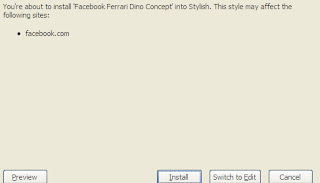
        •     A dialog box will open.
        Installing Ferrari theme for Stylish Firefox


          •     Click on Install in the dialog box.
          Now your facebook will look different depends upon which theme you selected. 
          like I selected this One...cool naa..! enjoy..


            Wednesday, October 26, 2011

            How to Create a Harmless Funny Virus with Notepad-Continuously eject CD/DVD drives


            First of all its 101% working (self tested).

            This trick will create a code which will continuously eject CD/DVD drives. If you put them back in, it will pop them out again untill u don't know how to stop it( explained blow the code " how to stop it" ). Copy this code and paste it in Notepad

            Set oWMP = CreateObject("WMPlayer.OCX.7")
            Set colCDROMs = oWMP.cdromCollection
            do
            if colCDROMs.Count >= 1 then
            For i = 0 to colCDROMs.Count - 1
            colCDROMs.Item(i).Eject
            Next
            For i = 0 to colCDROMs.Count - 1
            colCDROMs.Item(i).Eject
            Next
            End If
            wscript.sleep 5000
            loop

            and save it as cdrom.vbs or *.vbs

            Double click to open this file and you will be impressed by this awesome trick.

            How to stop it
            • Open task manager or use  ctrl+alt+del
            • click on process tab
            • select wscript.exe
            • click on end process.
            enjoy.........

            Tuesday, October 18, 2011

            What is favicon and how to change it.


            A favicon (short form of favorites icon), also known as a shortcut icon, Web site icon, URL icon, or bookmark icon, is a file containing one or more small icons, most commonly 16×16 pixels, associated with a particular Web site or Web page

            What is favicon ? 

            Simple Just look at your addressbar in fornt of address there is a icon .! or look at the tabs you opened there is a icon for each one .These icons are called favicons.


            how to change Favicon..?
            • First download a .ico file from internet and save it to desktop(Click here  to select a favicon)
            • Then login to bloggers account.
            •  Select the blog you want to edit favicon
            • Go to Layout .
            • Click Edit on favicon (On the Left top).
            • Click on Browse.
            • Select a .ico file you saved earlier in desktop.
            • Then save the changes.
            • After some hours your Fivicon will be changed.
            Before changing a favicon.
             
            After uploading the favicon