Showing posts with label security. Show all posts

Wednesday, February 20, 2013

Using Cryptography to Store Credentials Safely

random_droid


Following our talk "Security and Privacy in Android Apps" at Google I/O last year, many people had specific questions about how to use cryptography in Android. Many of those revolved around which APIs to use for a specific purpose. Let's look at how to use cryptography to safely store user credentials, such as passwords and auth tokens, on local storage.


An anti-pattern


A common (but incorrect) pattern that we've recently become aware of is to use SecureRandom as a means of generating deterministic key material, which would then be used to encrypt local credential caches. Examples are not hard to find, such as here, here, here, and elsewhere.


In this pattern, rather than storing an encryption key directly as a string inside an APK, the code uses a proxy string to generate the key instead — similar to a passphrase. This essentially obfuscates the key so that it's not readily visible to attackers. However, a skilled attacker would be able to easily see around this strategy. We don't recommend it.


The fact is, Android's existing security model already provides plenty of protection for this kind of data. User credentials should be stored with the MODE_PRIVATE flag set and stored in internal storage, rather than on an SD card, since permissions aren't enforced on external storage. Combined with device encryption, this provides protection from most types of attacks targeting credentials.


However, there's another problem with using SecureRandom in the way described above. Starting with Android 4.2, the default
SecureRandom provider is OpenSSL, and a developer can no longer override SecureRandom’s internal state. Consider the following code:


SecureRandom secureRandom = new SecureRandom();
byte[] b = new byte[] { (byte) 1 };
secureRandom.setSeed(b);
// Prior to Android 4.2, the next line would always return the same number!
System.out.println(secureRandom.nextInt());


The old Bouncy Castle-based implementation allowed overriding the internally generated, /dev/urandom based key for each SecureRandom instance. Developers which attempted to explicitly seed the random number generator would find that their seed replaces, not supplements, the existing seed (contrary to the reference implementation’s documentation). Under OpenSSL, this error-prone behavior is no longer possible.


Unfortunately, applications who relied on the old behavior will find that the output from SecureRandom changes randomly every time their application starts up. (This is actually a very desirable trait for a random number generator!) Attempting to obfuscate encryption keys in this manner will no longer work.


The right way


A more reasonable approach is simply to generate a truly random AES key when an application is first launched:


public static SecretKey generateKey() throws NoSuchAlgorithmException {
// Generate a 256-bit key
final int outputKeyLength = 256;

SecureRandom secureRandom = new SecureRandom();
// Do *not* seed secureRandom! Automatically seeded from system entropy.
KeyGenerator keyGenerator = KeyGenerator.getInstance("AES");
keyGenerator.init(outputKeyLength, secureRandom);
SecretKey key = keyGenerator.generateKey();
return key;
}


Note that the security of this approach relies on safeguarding the generated key, which is is predicated on the security of the internal storage. Leaving the target file unencrypted (but set to MODE_PRIVATE) would provide similar security.


Even more security


If your app needs additional encryption, a recommended approach is to require a passphase or PIN to access your application. This passphrase could be fed into PBKDF2 to generate the encryption key. (PBKDF2 is a commonly used algorithm for deriving key material from a passphrase, using a technique known as "key stretching".) Android provides an implementation of this algorithm inside SecretKeyFactory as PBKDF2WithHmacSHA1:


public static SecretKey generateKey(char[] passphraseOrPin, byte[] salt) throws NoSuchAlgorithmException, InvalidKeySpecException {
// Number of PBKDF2 hardening rounds to use. Larger values increase
// computation time. You should select a value that causes computation
// to take >100ms.
final int iterations = 1000;

// Generate a 256-bit key
final int outputKeyLength = 256;

SecretKeyFactory secretKeyFactory = SecretKeyFactory.getInstance("PBKDF2WithHmacSHA1");
KeySpec keySpec = new PBEKeySpec(passphraseOrPin, salt, iterations, outputKeyLength);
SecretKey secretKey = secretKeyFactory.generateSecret(keySpec);
return secretKey;
}


The salt should be a random string, again generated using SecureRandom and persisted on internal storage alongside any encrypted data. This is important to mitigate the risk of attackers using a rainbow table to precompute password hashes.


Check your apps for proper use of SecureRandom


As mentioned above and in the New Security Features in Jelly Bean, the default implementation of SecureRandom is changed in Android 4.2. Using it to deterministically generate keys is no longer possible.


If you're one of the developers who's been generating keys the wrong way, we recommend upgrading your app today to prevent subtle problems as more users upgrade to devices running Android 4.2 or later.


Monday, February 18, 2013

Gallery Lock Pro v4.0.3 Apk Android


Hide Pictures/Videos!
Selected as the App of the Year by Times Magazine!
Gallery Lock manages photos and videos by individually hiding them and it is an app that is absolutely needed for protection of personal privacy. The product is one of the most popular apps in the world and is one of the top 10 apps sold on Google Market.


Features
• Management of photos by individual folders
• Can be used for both photos and videos
• Can be conveniently used with other gallery apps
• Stealth mode provided (a function that hides the icons)
• Beautiful designs
• Pattern lock provided

# (Important!) Before deleting the Lite version, undo the hide function of the photos and the videos. If you uninstall the program without undoing the hide function, the photos and videos will be lost.

# Google will make a pre-charge of $1 the first time a transaction is made on Google Market to verify the information on your credit card. This can be misunderstood as being charged twice but there is no need to worry as this pre-charge will not appear on your monthly statement.

# It is recommended that you purchase the app after checking to see if the free assessment Lite version runs properly.
# "Outgoing Call" permission is needed for Stealth Mode
# Method to recover photos when problems occur
If for some reason Gallery Lock does not run, recovery can be made by following the method below.
1) Uninstall Gallery Lock
2) Download Gallery Lock from the Market and install it.
3) Go Setting in the Gallery Lock, Tap "Find/Recover Missing files" menu.
4) The missing files will be recovered to /mnt/sdcard/DCIM/recover path.
5) run default Gallery application and check whether those files are recovered properly.
# Please send an email for any questions that you have. The developer of the app does not have authorization to reply to comments here.
(KW:photo valut,video valut,photovault,videovault,image lock,photo lock,image safe,photo safe,protector,stealth,hide photo,kii,stock,Keep Safe,kii safe,hide video,hide picture,vault,hide it,Hide Pictures in Stocks App,secret gallery,gallery,privacy,gallerylock,gallery private,gallery hide,hide gallery,quick pic,quick,ロック)

Click Here To Download
Direct Download Link - Direct Download Link


Friday, February 15, 2013

Security Enhancements in Jelly Bean

Posted by Fred Chung, Android Developer Relations team


Android 4.2, Jelly Bean, introduced quite a few new features, and under the covers it also added a number of security enhancements to ensure a more secure environment for users and developers.


This post highlights a few of the security enhancements in Android 4.2 that are especially important for developers to be aware of and understand. Regardless whether you are targeting your app to devices running Jelly Bean or to earlier versions of Android, it's a good idea to validate these areas in order to make your app more secure and robust.


Content Provider default access has changed


Content providers are a facility to enable data sharing amongst app and system components. Access to content providers should always be based on the principle of least privilege — that is, only grant the minimal possible access for another component to carry out the necessary tasks. You can control access to your content providers through a combination of the exported attribute in the provider declaration and app-specific permissions for reading/writing data in the provider.


In the example below, the provider ReadOnlyDataContentProvider sets the exported attribute to "true", explicitly declaring that it is readable by any external app that has acquired the READ_DATA permission, and that no other components can write to it.


<provider android:name=”com.example.ReadOnlyDataContentProvider”
android:authorities=”com.example”
android:exported=”true”
android:readPermission=”com.example.permission.READ_DATA” />


Since the exported attribute is an optional field, potential ambiguity arises when the field is not explicitly declared in the manifest, and that is where the behavior has changed in Android 4.2.


Prior to Jelly Bean, the default behavior of the exported field was that, if omitted, the content provider was assumed to be "exported" and accessible from other apps (subject to permissions). For example, the content provider below would be readable and writable by other apps (subject to permissions) when running on Android 4.1 or earlier. This default behavior is undesirable for sensitive data sources.


<provider android:name=”com.example.ReadOnlyDataContentProvider”
android:authorities=”com.example” />


Starting in Android 4.2, the default behavior for the same provider is now “not exported”, which prevents the possibility of inadvertent data sharing when the attribute is not declared. If either the minSdkVersion or targetSdkVersion of your app is set to 17 or higher, the content provider will no longer be accessible by other apps by default.


While this change helps to avoid inadvertent data sharing, it remains the best practice to always explicitly declare the exported attribute, as well as declaring proper permissions, to avoid confusion. In addition, we strongly encourage you to make use of Android Lint, which among other things will flag any exported content providers (implicit or explicit) that aren't protected by any permissions.


New implementation of SecureRandom


Android 4.2 includes a new default implementation of SecureRandom based on OpenSSL. In the older Bouncy Castle-based implementation, given a known seed, SecureRandom could technically (albeit incorrectly) be treated as a source of deterministic data. With the new OpenSSL-based implementation, this is no longer possible.


In general, the switch to the new SecureRandom implementation should be transparent to apps. However, if your app is relying on SecureRandom to generate deterministic data, such as keys for encrypting data, you may need to modify this area of your app. For example, if you have been using SecureRandom to retrieve keys for encrypting/decrypting content, you will need to find another means of doing that.


A recommended approach is to generate a truly random AES key upon first launch and store that key in internal storage. For more information, see the post "Using Cryptography to Store Credentials Safely".


JavascriptInterface methods in WebViews must now be annotated


Javascript hosted in a WebView can directly invoke methods in an app through a JavaScript interface. In Android 4.1 and earlier, you could enable this by passing an object to the addJavascriptInterface() method and ensuring that the object methods intended to be accessible from JavaScript were public.


On the one hand, this was a flexible mechanism; on the other hand, any untrusted content hosted in a WebView could potentially use reflection to figure out the public methods within the JavascriptInterface object and could then make use of them.


Beginning in Android 4.2, you will now have to explicitly annotate public methods with @JavascriptInterface in order to make them accessible from hosted JavaScript. Note that this also only takes effect only if you have set your app's minSdkVersion or targetSdkVersion to 17 or higher.


// Annotation is needed for SDK version 17 or above.
@JavascriptInterface
public void doSomething(String input) {
. . .
}


Secure USB debugging


Android 4.2.2 introduces a new way of protecting your apps and data on compatible devices — secure USB debugging. When enabled on a device, secure debugging ensures that only host computers authorized by the user can access the internals of a USB-connected device using the ADB tool included in the Android SDK.


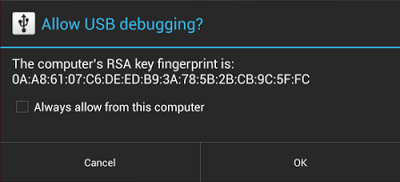
Secure debugging is an extension of the ADB protocol that requires hosts to authenticate before accessing any ADB services or commands. At first launch, ADB generates an RSA key pair to uniquely identifies the host. Then, when you connect a device that requires secure debugging, the system displays an authorization dialog such as the one shown below.


The user can allow USB debugging for the host for a single session or can give automatic access for all future sessions. Once a host is authorized, you can execute ADB commands for the device in the normal way. Until the device is authorized, it remains in "offline" state, as listed in the adb devices command.


For developers, the change to USB debugging should be largely transparent. If you've updated your SDK environment to include ADB version 1.0.31 (available with SDK Platform-tools r16.0.1 and higher), all you need to do is connect and authorize your device(s). If your development device appears in "offline" state, you may need to update ADB. To so so, download the latest Platform Tools release through the SDK Manager.


Secure USB debugging is enabled in the Android 4.2.2 update that is now rolling out to Nexus devices across the world. We expect many more devices to enable secure debugging in the months ahead.


More information about security best practices


For a full list of security best practices for Android apps, make sure to take a look at the Security Tips document.


Thursday, January 3, 2013

Mobile AntiVirus Security PRO v3.0.3 Apk Android


AVG Antivirus for Smartphones & Tablets detects harmful apps & SMS
AVG Mobilation™ AntiVirus Pro for Android™ is a mobile security solution that helps protect your mobile device from viruses, malware, spyware & online exploitation in real-time.


Download AVG Mobilation™ today and:
√ Scan apps, settings, files, and media in real time
√ Find/locate your lost or stolen phone via Google Maps™
√ Lock and wipe your device to protect your privacy
√ Kill tasks that slow your mobile device
√ Browse the Web safely and securely
√ Monitor battery, storage and mobile data package usage on your device

AVG Mobilation Antivirus Pro – mobile security software for Android. Keep your device safe with just one click!

With the AVG Mobilation security product for Android you’ll receive effective, easy-to-use virus and malware protection, as well as a real-time app scanner, phone locator, task killer, app locker, and local device wipe to help shield you from threats to your privacy and online identity.
Real-time security scanner protection keeps you protected no matter how or from where you download your apps or games.

AVG Mobilation Anti-Virus Pro also:
√ Defends against malicious apps, viruses, malware and spyware
√ Identifies unsecure device settings and advises on how to fix them
√ Ensures contacts, bookmarks and text messages are safe
√ Checks media files for malicious software and security threats
√ Guards you from phishing attacks
√ Can be scheduled to run daily, weekly, or on demand scans

Features at a glance:

Anti-theft and Phone Location:
√ Locate your lost or stolen mobile and get help with finding it via Google Maps™
√ Turn your phone GPS on remotely and have the device send its location using GPS
√ Lock your mobile device remotely via our ‘Anti-theft service or by sending a text message to your phone to guard your private data
√ Set a lock screen message to help the locator find you
√ Make your device ring even if your cell phone is on silent mode

Safe Web Surfing:
√ Search, shop and use social networks with peace of mind knowing your identity and personal data are protected from phishing and malware while surfing the web
√ Scan website addresses to see if they are harmful sites. If suspicious URL address is detected, you will be redirected to a “Safe Page”

Tune-up: Monitor Battery, Storage and Mobile Data Package to Optimize Device Performance:
√ Get notified when your battery is below the level you indicated and turn-off functions not in use in order to save power
√ Storage optimization monitors internal and SD card usage and helps optimize storage space on your mobile device
√ Move apps or games between the SD Card and internal storage with the help of a list of apps sorted by size and location
√ Traffic monitor - keep track of your 3G /4G data plan usage by getting notifications when you are near to reaching your monthly data plan limit

Task killer:
√ Kill tasks that slow down or freeze up your device

Local wipe:
√ Ability to completely wipe contacts, text messages, photos, browser history, calendar, format SD card, and restore mobile device to factory settings
√ Manually select specific data and information from your mobile device that you want deleted, such as synced email accounts, browser history and bookmarks using the Local Wipe advanced feature

App locker and mobile privacy
√ Lock apps to protect your privacy and safety or lock your device settings to secure its configuration

Antivirus languages currently supported:
English, German, Spanish, French, Japanese, Korean, Chinese (simplified & traditional), Portuguese, Russian, Arabic, Italian, Polish, Czech, Dutch and Hebrew.

Click Here To Download
Direct Download Link - Direct Download Link


Saturday, December 8, 2012

Kaspersky Mobile Security v9.10.129 Apk Android


Premium anti-virus, anti-theft & web security with SMS/Call filtering.
"KASPERSKY MOBILE SECURITY IS ONE OF THE BEST MALWARE PROTECTION SOLUTIONS"
Protect your smartphone like the mini-PC that it is. Kaspersky Mobile Security delivers real-time protection from viruses, spam, malicious programs, and unwanted calls and SMS texts, plus an instant, cloud-based scanning of downloaded apps.


Our unique privacy mode allows you to control access to your contacts and communications. And, advanced anti-theft protection remotely disables, cleans, and finds your missing phone via Google Maps – even if your SIM card has been replaced.

ANTI-THEFT PROTECTION: Block, clean or find your missing phone even if your SIM card has been replaced


ANTI-VIRUS PROTECTION:
• The latest technologies prevent viruses and spam from infecting your phone while you’re surfing the Internet
• Automatic, cloud-based scanning of downloaded apps
• On-demand and scheduled scans allow you to set up antivirus scanning when it’s most convenient for you

CALL & SMS FILTER: Blocks unwanted calls and SMS texts

PRIVACY PROTECTION:
• Control what others can see and access when they pick up your phone
• Keep designated incoming calls and SMS texts completely hidden until you’re ready to view them
• Activate “Private” mode manually, automatically, or remotely

SUPPORTED LANGUAGES
Danish, Dutch, English, Finnish, French, German, Italian, Korean, Norwegian, Polish, Portuguese (Brazil), Russian, Spanish, Swedish

SYSTEM RQUIREMENTS
Android 1.6 – 2.3

Click Here To Download
Direct Download Link


Avast! Mobile Security Pro v1.0.1282 Apk Android


Full-featured & top-rated antivirus/anti-theft security app for your Android!
Download avast! Mobile Security now and you can:
• protect personal data with infected-URL alerts and automatic virus scans;
• stop hackers with the firewall (works on rooted phones only);
• control your phone with anti-theft features via SMS: history wipe, phone lock, siren activation, GPS tracking and many other tools;
• make our security app ‘invisible’, making it extremely hard for thieves to find and disable.


A standalone yet tightly integrated component of avast! Mobile Security, avast! Anti-Theft is the slyest component on the market. Formerly known as Theft Aware, the Anti-Theft portion of avast! Mobile Security has been recommended by leading industry experts that include T-Mobile, N-TV, AndroidPIT, and Android Police.

Antivirus
Performs on-demand scans of all installed apps and memory card content, as well as on-access scans of apps upon first execution. Options for scheduling scans, virus definition updates, uninstalling apps, deleting files, or reporting a false-positive to our virus lab.

Privacy Report
Scans and displays (grid) access rights and intents of installed apps, identifying potential privacy risks, so you know how much info you are really providing to each app.

SMS/Call Filtering
Filter calls and/or messages from contact list using set parameters based on day(s) of the week, start time, and end time. Blocked calls redirect to voicemail, while blocked messages are stored via filter log. Also possible to block outgoing calls.

App Manager
Similar to Windows Task Manager, it shows a list of running apps and their size (MB), CPU load, used memory, and number of threads and services – with an option to stop or uninstall.

Web Shield
Part of the avast! WebRep cloud, the avast! Web Shield for Android scans each URL that loads and warns you if the browser loads a malware-infected URL.

Firewall
Add a firewall to stop hackers. Disable an app’s internet access when on WiFi and 3G and roaming mobile networks. (Works only on rooted phones.)

App Disguiser
After downloading avast! Anti-Theft, user can choose a custom name that disguises the app (e.g. call it “Pinocchio game”) so that it is even harder for thieves to find and remove.

Stealth Mode
Once anti-theft is enabled, the app icon is hidden in the app tray, leaving no audio or other trace on the target phone – the app is ‘invisible’, making it difficult for thieves to detect or remove.

Self-Protection
Extremely difficult for thieves to remove (especially on rooted phones), Anti-Theft protects itself from uninstall by disguising its components with various self-preservation techniques. On rooted phones it is able to survive hard-resets and can even disable the phone’s USB port.

Battery Save
Anti-Theft only launches itself and runs when it needs to perform tasks. This preserves battery life and makes it very difficult for thieves to shut it down.

SIM-Card-Change Notification
If stolen and a different (unauthorized) SIM card inserted, the phone can lock, activate siren, and send you notification (to remote device) of the phone’s new number and geo-location.

Trusted SIM Cards List
Establish a ‘white list’ of approved SIM cards that can be used in the phone without triggering a theft alert. You can also easily clear the trusted SIM cards list, to leave the one present in the phone as the only trusted one.

Remote Settings Change
A setup wizard guides the user through the installation process on rooted phones. No command-line knowledge is necessary to install Anti-Theft rooted. Also supports upgrading.

Remote Features
SMS commands provide you the following REMOTE options for your ‘lost’ (or stolen) phone:
Siren, Lock, custom Display properties, Locate, Memory Wipe, covert Calling, Forwarding, “Lost” Notification, SMS Sending, History, Restart, and more.

Click Here To Download
Download Link


Friday, September 28, 2012

कंप्यूटर के लिए 6 रजिस्ट्री क्लीनर सॉफ्टवेर वो भी मुफ्त में|

आप के कंप्यूटर के लिए एक फ्री रजिस्ट्री क्लीनर सॉफ्टवेर जिसकी मदद से आप अपने कंप्यूटर के रजिस्ट्री में बने फालतू और बिना काम के इंट्री को डिलीट कर सकते है । कंप्यूटर की स्पीड को तेज बनाये रखने के लिए सिस्टम से गैर जरुरी फाइल और फोल्डर को हटाना बहुत ज़रूरी होता है और रजिस्ट्री की साफ़ सफाई भी बहुत ज़रूरी है | कंप्यूटर से बिना काम के फाइल और फोल्डर को डिलीट करने का सबसे अच्छा और आसान तरीका है की आप CCleaner या इसके जेसा कोई और रजिस्ट्री क्लीनर सॉफ्टवेर डाउनलोड करलें और समय-समय पर इस सॉफ्टवेर को चला के अपने कंप्यूटर और कंप्यूटर के रजिस्ट्री से गैर ज़रूरी चीजों को डिलीट करते रहे इससे आप का कंप्यूटर तेज़ और सुरक्षित रहेगा | आज मै आप को कुछ फ्री रजिस्ट्री क्लीनर सॉफ्टवेर का डाउनलोड लिंक दे रहा हु|  


जिनको आप डाउनलोड करके अपने कंप्यूटर में इस्तेमाल कर सकते हैं |वेसे सबसे अच्छा रजिस्ट्री क्लीनर सॉफ्टवेर मेरे अनुसार CCleaner है जो इस्तेमाल में बहुत आसान और फ्री भी है|


CCleaner


jetclean


Regsofts


Regseeker


 WiseCleaner


Cleaner for Window


Thursday, September 27, 2012

क्या आप का कंप्यूटर स्लो है ?

अगर आप का कंप्यूटर या लैपटॉप बहुत स्लो हो गया है तो आप एक बार इस ToolWiz Care सॉफ्टवेर का उपयोग कर के देखें |इस टूल के द्वारा आप के सिस्टम की स्पीड काफी हद तक ठीक हो जाएगी | इस एक सॉफ्टवेर में बहुत सारे उपयोगी टूल्स हैं जिनके द्वारा आप अपने सिस्टम की कई परेशानियों से निजात पा सकते हैं| 


इस ToolWiz Care सॉफ्टवेर में आप के सिस्टम के लिए System Check-up, System Clean-up, System Speed-up, System Fix-up, System Back-up, System Satrtup Optimizer, और System Virtualization जेसे कई उपयोगी टूल्स हैं जो आप के सिस्टम के लिए बहुत उपयोगी साबित होंगे | ये एक फ्री सॉफ्टवेर है | 

डाउनलोड करने के लिए यहाँ क्लिक करें । 


Monday, September 24, 2012

Spyware,Malware जेसे हानिकारक प्रोग्राम द्वारा कंप्यूटर में होने वाले किसी भी बदलाव की जानकारी पाने का तरीका |

अगर आप हमेशा इन्टरनेट से सॉफ्टवेर,विडियो या कोई और फाइल डाउनलोड करते रहते हैं तो इस बात के बहुत चांस है की आप के कंप्यूटर में spyware या malware आ गए हो और जब किसी कंप्यूटर या लैपटॉप में spyware, malware आते हैं तो बिना किसी जानकारी के वो कंप्यूटर में बहुत सारे बदलाव कर देते हैं कंप्यूटर के रजिस्ट्री फाइल को बदल देते हैं स्टार्टअप प्रोग्राम में बदलावों कर देते हैं और ये बदलाव ऐसे होते हैं जो कंप्यूटर को हानी पंहुचा सकते हैं | अगर वक़्त रहते कंप्यूटर में हुवे बदलाव का पता चल जाये तो आने वाले कई तरह की परेशानियों से बचा जा सकता है |कंप्यूटर के रजिस्ट्री जो किसी भी कंप्यूटर की आत्मा होती है में किसी भी तरह के हुवे बदलाव का पता लगाना बिना किसी सॉफ्टवेर के बहुत बहुत मुश्किल है | 


अगर आप चाहते हैं की आप के अनुमति के बिना आप के कंप्यूटर में हुवे बदलाव के बारे में आप को जानकारी मिल जाये तो आप इस सॉफ्टवेर की मदद ले सकते हैं |OldTimer नाम का ये सॉफ्टवेर आप को आप के कंप्यूटर में हुवे किसी भी तरह के बदलाव की जानकारी आप को देता है | इस सॉफ्टवेर को जब किसी कंप्यूटर में रन कराया जाता है तो ये सॉफ्टवेर उस कंप्यूटर की मौजूदा फाइल और रजिस्ट्री के डाटा को याद कर लेता है उसके बाद अगर कंप्यूटर के किसी फाइल या रजिस्ट्री में किसी तरह का बदलाव होगा तो ये सॉफ्टवेर उस बदलाव के बारे में तुरंत आप को बताएगा | इसके आलावा इस सॉफ्टवेर के द्वारा कंप्यूटर से spyware और malware जेसे हानिकारक प्रोग्राम को ढूंढ़ के डिलीट भी किया जा सकता है |


डाउनलोड करने के लिए यहाँ क्लिक करें ।


कंप्यूटर से autorun viruses को डिलीट करें |

AMPAWsmasherX एक बहुत प्रभावी सुरक्षा सॉफ्टवेर है ये सॉफ्टवेर आप के कंप्यूटर या लैपटॉप को autorun viruses से सुरक्षित रखता है और इस सॉफ्टवेर के मदद से आप अपने कंप्यूटर से malwares को भी डिलीट कर सकते हैं |ये सॉफ्टवेर आप के कंप्यूटर के रजिस्ट्री एडिट के आप्शन को भी ब्लाक कर देता है क्यों की कंप्यूटर के लिए खतरनाक माने जाने वाले Trojans कंप्यूटर के रजिस्ट्री में बदलाव कर देते हैं और ये कंप्यूटर को नुकसान पंहुचा सकते हैं | 


ये सॉफ्टवेर उन viruses को भी डिलीट कर देता है जो किसी कंप्यूटर के taskmanager, run, और regedit को डिसेबल कर देते हैं| ये सॉफ्टवेर एक्सटर्नल डीवाइस से आने वाले viruses से भी कंप्यूटर की सुरक्षा करता है | 

ये सॉफ्टवेर 3 MB का है और ये विंडो विस्ता और XP के लिए है ।   

इस सॉफ्टवेर को डाउनलोड करने के लिए यहाँ क्लिक करें । 


Saturday, March 24, 2012

Locking Folders without any third party software


Locking Folders without any third party software 


Hi guys<<<<

Back with a interesting trick>>>>>>>>

There are some folders in the computer which contain some imp. information,,,,, so here is the trick to lock these folders without any software...

Consider you want to lock a folder named in your E:\, whose path is E:\.
Now open the Notepad and type the following


ren .{21EC2020-3AEA-1069-A2DD-08002B30309D} 
Where is your folder name. Save the text file as loc.bat in the same drive.
Open another new notepad text file and type the following

ren .{21EC2020-3AEA-1069-A2DD-08002B30309D} 

Save the text file as key.bat in the same drive.
Steps to lock the folder:

To lock the folder, simply click the loc.bat and it will transform into control panel icon which is inaccessible.
To unlock the folder click the key.bat file. Thus the folder will be unlocked and the contents are accessible

PS: This is not worked fine in my system. But My Friend still arguing with me that this trick is working fine for him. So I thought Posting it here will be useful for others.

ppLEASEE  FOLLOW  this blog and ADD COMMENT IF U HAV ANY PROBLEM                            PLEASEEEE SHARE  THIS BLOG ON FACEBOOK  / GOOGLE+        IF U LIKE IT     AADISH 


Wednesday, February 15, 2012

How can we lock pdf files and how to unlock it?


 How can we lock pdf files and how to unlock it?


Password protection of your PDF file ensures that the PDF can only be opened by the intended recipient of the file. Password protection can also be used to prevent users from printing or editing the document. These settings can be further tweaked to allow only low resolution printing, and varying degrees of editing.


METHOD 1
To password protect your PDF document in Adobe Acrobat Reader,
go to Advanced > Security > Encrypt With Password.
A prompt will appear asking if you are sure you want to change the security settings. Click on Yes. 


Select Encrypt all document contents, check Require password to open document, and enter the password in the “document open password” field.
If you want control on the permissions to print and edit the document, 
check Restrict editing and printing. Provide the password for changing these settings. Make sure Enable copying of text, images, and other content is unchecked. Click on OK.

A prompt will appear asking you to confirm the passwords you have entered. Another prompt states clearly that not all third-party programs respect the security settings in the PDF file. 


METHOD 2
To lock the pdf files, you need to set a password before you convert the file to pdf. It's easy to make it with Simpo PDF Creator. 

You can set "not allow printing", "not allow copy" etc.

To unlock the pdf, you could use password remover software, or convert the pdf to a new pdf again.

METHOD 3


If you want to lock your PDF file and then unlock it, you can try A-PDF Password Security. This software is professional on protecting any PDF file with different security levels, and you can set restrictions such as non-printing, non-copying to PDF files. And also you can use the tool to remove those restrictions as you doesn't need. 
METHOD 4

use Solid PDF Creator. This will allow you to print your files to PDF and you can set the 
security level that it can only be opened with a password you set. This is a free download and free trial


PLEASEE
  FOLLOW  this blog and ADD COMMENT IF U HAV ANY PROBLEM                            PLEASEEEE SHARE  THIS BLOG ON FACEBOOK  / GOOGLE+        IF U LIKE IT     AADISH