Tuesday, November 27, 2012

Designing for Tablets? We’re Here to Help!

Posted by Roman Nurik, who often writes about Android design-related topics on Google+

So you’ve got a great Android phone app on Google Play, your users love it, and you’re kicking back and watching the download numbers soar. Congrats! But like any enterprising developer, you may be thinking, “how do I take my app’s success even further?” The answer: an equally awesome experience on tablets. Users love their tablet apps! For example, Mint.com found that the larger screen real estate allowed tablet users to engage with their budget data 7x more than on phones. And TinyCo found that on average, paying users spent 35% more on tablets than on handsets. So now is the right time to think about how your app translates onto these larger screen devices that are designed to meet users’ more generic, everyday computing needs.

In this post, we’ll recap some of the resources available for crafting a great tablet experience for your users. These resources are useful for everyone in the app development pipeline—from product managers, to designers, to developers, and QA engineers.

Android Design Guidelines

No conversation about Android app design or development should go very far without first consulting the Android Design guidelines. While most of the sections are relevant to all Android devices, certain sections stand out as particularly relevant to design on tablets.

The Devices and Displays page introduces the concept of density-independence. For example, although the Nexus 4, Nexus 7, and Motorola XOOM all have a similar pixel resolution (1280x768, 1280x800, and 1280x800 respectively), they have vastly different screens. Instead of thinking in pixels, think in dips (density-independent pixels)—that way, it’s much easier to conceptualize the difference between Nexus 4 (640x384 dp), Nexus 7 (960x600dp), and Nexus 10 or the Motorola XOOM (1280x800 dp).

Following the 48dp rhythm discussed in Metrics and Grids helps take some of the guesswork out of sizing elements, especially for tablets. When in doubt, use multiples of 48dp (or 16dp for a finer grid) for sizing elements horizontally and vertically. For example, when showing sparse content on larger screens, consider using generous side margins of 96dp or 144dp. Or when deciding how wide your master pane should be in a master/detail layout for 10” tablets, see how your master content looks and feels with a width of 240dp or 288dp.

The Multi-pane Layouts guide discusses use cases and examples for combining related views into a single screen to simultaneously improve app navigation and make optimal use of the available screen real estate. It also discusses strategies for laying out content across both portrait and landscape, all while maintaining functional parity across orientations. Since users enjoy using tablets in both portrait and landscape orientations, it’s even more important to react properly to orientation changes than with phones.

Lastly, the Downloadable Stencils offer designers a great starting point for high-fidelity mockups, complete with reference device outlines, correctly sized action bars, and more.

Android Training for Developers

The Training section of the developer site offers task-oriented technical training material, complete with flow diagrams, code snippets, sample projects and more. Several of these ‘classes’ are geared toward helping developers understand how to scale your apps across any screen size.

The Designing Effective Navigation class—aimed more at the initial design phase of the app creation process—offers a methodology for effectively planning and grouping screens on tablets, and even shows example wireframes for a simple news reader application following this methodology.

The classes Building a Dynamic UI with Fragments and Designing for Multiple Screens demonstrate how to use fragments in conjunction with Android’s resources framework. They show how to easily choose between tablet and handset layouts at runtime while maximizing code reuse and minimizing your application size using resource aliases. They also demonstrate techniques for adapting UI flows based on the current layout.

Lastly, while not precisely a training class, the Supporting Tablets and Handsets document offers even more information about some of these key best practices. And if you’re the type of developer that would prefer to skip the text and jump right into the code, you can even add a Master/Detail flow, complete with handset and tablet support, to your app with just a few clicks using the Android Developer Tools for Eclipse.

Android Design in Action Highlights

Each week, a few of us on the developer relations team get together on the Android Design in Action live show to discuss Android design best practices, as well as provide original ‘redesign’ mockups to help demonstrate our vision of how Android apps should look and feel.

A recent episode focused on the topic of responsive design, or designing flexible apps that can adapt to whatever screen size or form factor they’re run on:

In the episode, we celebrated successful examples of responsive design on Android, ranging from creating calendar events in Google Calendar, to browsing wallpapers and stories in Pattrn and Pocket, to playing video in TED, and finally to managing your conference schedule in the open-source Google I/O 2012 app.

We also regularly feature tablet design concepts on the show (some are shown below), so we highly recommend tuning in each week for design ideas.
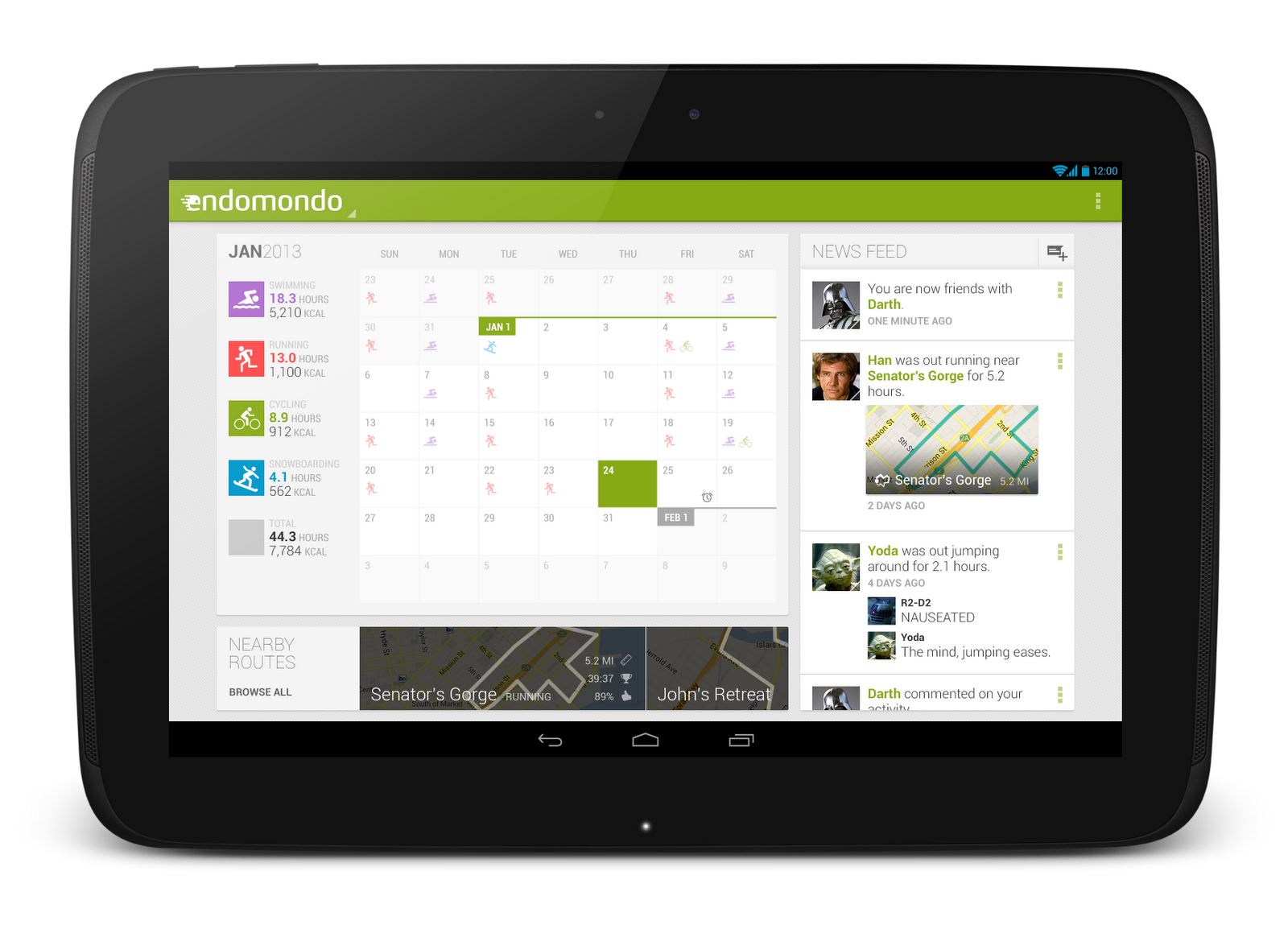
 

For even more tablet app inspiration, check out a few of these apps: Expedia Hotels & Flights, Pulse News, SeriesGuide, Tasks and Timer.

The Tablet Quality Checklist

Over in the “Distribute” section of developer.android.com, the recently published Tablet App Quality checklist is a great way to check if your app is tablet-ready along a variety of technical dimensions. You should make sure that everyone involved in your mobile products is aware of  the standards defined in this checklist, as it is one of the ways in which the Google Play team selects apps to feature in the Staff Picks for Tablets collection.

So What are You Waiting For?

2013 is almost here, and it’s looking to be another exciting year for Android tablets. Make sure your app is positioned to succeed in the evolving device landscape by following some of the best practices and examples discussed here and on the rest of developer.android.com.

If you have specific questions about your app, let us know on Google+ (+Android Developers) or Twitter (@AndroidDev)!

Monday, November 26, 2012

New-Best Latest gapps for Android Phones (Funny, Games,) 2012

Many android users regularly find out some latest gapps 2012 for more fun. But the problem is Google launch many different app for different types of users in this post I will tell you some business, games and top app in this week. So get ready for more excitement on daily basis

Different types of people search different app, but mostly look for fun that’s why first I will discuss some funny android gapps.Mostly developers try to make some extraordinary app like talking tom or angry birds for android. One of the great thing that Google apps is not much expensive, as you can seen best hd game “asphalt 7” in just 4.99$ and plenty of awesome app under 1$.


Latest Funny Gapps 2012


Here are some latest funny gapps, you have to try this for making more fun with your friends.

Tongue Twisters

Now get ready for reshape your friends mouth with twisting tongue in many directions. You just follow the character in the screen and act like that. You can see your face during doing that easy to impossible twist. You can just rolling bar from easy to difficult level and check out your friend’s capability.


Funny Face

Don’t assume that app like Photoshop effects, many more things added by developers for making more fun with disturbing your face appearance. Plenty of option for you to apply on any particular face. One of the coolest things is that, you immediately add special effect as capturing the image. So ready for wonder your friends during capturing and modifying their pic.

Latest Games Gapps 2012


Just like funny android app, Google releases many exciting games app for crazy gamers, so check out some.

Bejeweled

This one is really time passing game; you can call it advance puzzled bubble game. Not similar like that. More than 500 millions of user already download this app, so why not you? It’s also the most popular games of pc related to puzzled bubble.


Cut the Rope

It’s also another best puzzle video game. You could sure what next at another door after cutting the rope.Plenty of interesting level; you have to face in cut the rope app.I normally play asphalt 6 for pc game.

Although many more releases about latest gapps 2012, but you have to download these one if you miss. Stay connect with us for know more about gaming or android world.


Sunday, November 25, 2012

Scramble With Friends v4.82 Apk Android


The fast, fun word-finding game everyone's playing! The wait is over! Play the deluxe version of Scramble With Friends™! ★ EARN TOKENS TWICE AS FAST! ★ NO ADS! ★
Scramble With Friends™ joins the world's most popular word-game franchise...if you like Words With Friends™ and Hanging With Friends™, then you’ll love the newest addiction for wordies!

Scramble With Friends™ is the fast, fun game of finding words in a jumbled grid. Quickly slide your finger over adjacent letters to form words forwards, backwards, sideways...any way you can!


Download Scramble With Friends™ to start playing today and join the millions of other players worldwide in Zynga’s newest must-have app!

Features in Scramble With Friends™:
★ Ad-Free!
★ A fast-paced, exciting new word game from the makers of Words With Friends™!
★ Challenge your friends in 3, two-minute rounds...the player with the highest score wins.
★ Power-Ups! Use Freeze Time, Inspire, and Scramble to gain an edge on your friends!
★ Login with your Facebook© account to play against your friends, or challenge a random opponent across the world.
★ View all of your in-progress games or launch a new game directly from the home screen widget.


Click Here To Download
Direct Download Link


माऊस व्हील का कमाल |

माऊस का इस्तेमाल हम क्लिक और राईट क्लिक के लिए करते हैं।लेकिन अगर आप चाहे तो माऊस व्हील का इस्तेमाल एक बटन के रूप में भी कर सकते हैं । किसी भी लिंक पर माऊस व्हील को क्लिक करने पर वह सीधा नए टैब में खुल जाता है और किसी खुले हुवे टैब पर माऊस व्हील क्लिक करने पर वह बंद हो जाता है । 


अगर आप इन्टरनेट सर्फिंग के लिए firefox या क्रोम का इस्तेमाल करते हैं तो आप सर्फिंग के वक़्त आप माऊस व्हील का इस्तेमाल बेक और फॉरवर्ड बटन के रूप में भी कर सकते हैं इसके लिए shift को दबा के रखे और माऊस व्हील को अगर आप आगे पीछे करें । और अगर आप किसी पेज को जूम इन या आउट करना चाहते हैं तो ctrl को दबा के रखें और माऊस व्हील को आगे पीछे करें ।

Zombie Gunner v1.0.0 Apk Android


Blood-Splattering Action Fun!
A zombie infection has spread throughout the town. Hundreds of citizens now roam the streets, hungry for flesh. Amidst the chaos, Andrew has lost his daughter, Lisa! Help him rescue civilians and find his daughter while solving the mystery behind the strange zombie appearances!


Filled with explosive zombie-killing gameplay and a storyline with twists and turns, players won’t be able to put the game down!


FEATURES

SIDE-SCROLLING ZOMBIE KILLING ACTION
Simple yet so satisfying gameplay with easy controls and nonstop action will have you glued to your screen!

ENDLESS VARIATIONS OF WEAPONS AND MACHINES
Choose from a wide collection of weapons you’ll use to zap, burn or explode zombie guts! Bazookas? Flam throwers? We got it.

ADD NEW CHARACTERS
Along the way, you’ll meet a strange cast of characters. Add them to help you in each quest and eventually find Lisa!

NEW STAGE CHALLENGES
Clear new stages with different challenges that are time based, technique based and so much more! Defeat bosses and unravel the mystery of the zombie invasion!


Click Here To Download
Direct Download Link


Saturday, November 24, 2012

Street Fighter II v1.0 Apk Android


it's the most popular game in our memory ! enjoy it!
A two-person battle game appear in the arcade in Japan in August 1987, has been a huge leap compared to the early years of "Kung Fu", which generation Street Fighter is the CAPCOM launched arcade fighting game "Street Fighter" (Street Fighter).


The two main characters of the game, Long and Ken are karate the climax master, they jointly participated in the world martial arts competition, through the showdown with nine masters from around the world. Long virtue of the strongest karate esoteric - liter Dragon Fist fighting regal title of Muay Thai king Sha Gaite will have knocked down, and left a long scar on his chest and win Long embarked on a challenge to stronger roads.

Many of the basic concepts of fighting games is it established, such as nirvana, light heavy, defense, stamina, and a time limit. If someone successfully use nirvana defeat an opponent, you'll get a sense of indescribable pleasure. Not the first generation of "Street Fighter" no later Rounds of the entire series.

Click Here To Download
Direct Download Link


Space Puzzle v1.2 Apk Android


Help Intellibuzz reach the space station! This paid version of Space Puzzle contains 40 levels. Before you buy, try the free Space Puzzle Lite which comes with 20 levels.
Intellijoy's MissinGames division is pleased to announce the launch of Space Puzzle, a brainy game for both parents and kids.


The object of the Space Puzzle is simple.

Given a limited number of wall-to-wall moves, help Intellibuzz reach the Space Station. While at it, collect as many stars as you can.

Space Puzzle game will improve your and your child's spatial logic skills and encourage anticipative thinking.

Click Here To Download
Direct Download Link