Posted by Daniel Sandler, a software engineer on the Android System UI teamI’ve always loved screen savers. Supposedly they exist for a practical purpose: protecting that big, expensive monitor from the ghosts of spreadsheets past.
But I’ve always imagined that your computer is secretly hoping you’ll stand up and walk away for a bit. Just long enough for that idle timer to expire…so it can run off and play for a little while. Draw a picture, set off fireworks, explore the aerodynamics of kitchen appliances, whatever—while always ready to get back to work at a keystroke or nudge of the mouse.
Daydream, new in Android 4.2, brings this kind of laid-back, whimsical experience to Android phones and tablets that would otherwise be sleeping. If you haven’t checked it out, you can turn it on in the Settings app, in Display > Daydream; touch When to Daydream to enable the feature when charging.
An attract mode for apps
Apps that support Daydream can take advantage of the full Android UI toolkit in this mode, which means it’s easy to take existing components of your app — including layouts, animations, 3D, and custom views—and remix them for a more ambient presentation. And since you can use touchscreen input in this mode as well, you can provide a richly interactive experience if you choose.
Daydream provides an opportunity for your app to show off a little bit. You can choose to hide some of your app’s complexity in favor of one or more visually compelling experiences that can entertain from across a room, possibly drawing the user into your full app, like a video game’s attract mode.
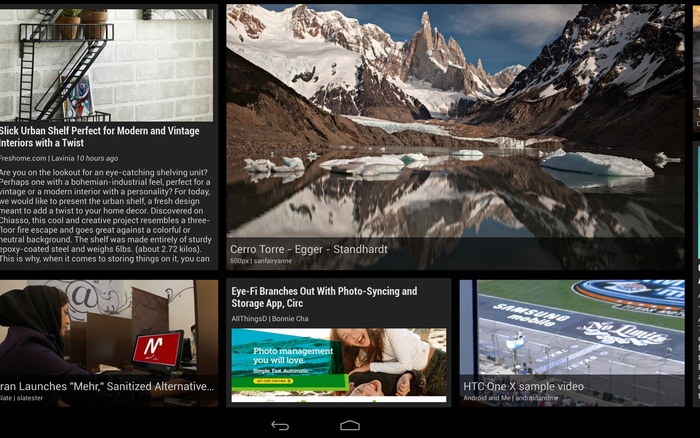
Figure 1. Google Currents scrolls stories past in a smooth, constantly-moving wall of news.
Google Currents is a great example of this approach: as a Daydream, it shows a sliding wall of visually-interesting stories selected from your editions. Touch a story, however, and Currents will show it to you full-screen; touch again to read it in the full Currents app.
The architecture of a Daydream
Each Daydream implementation is a subclass of android.service.dreams.DreamService. When you extend DreamService, you’ll have access to a simple Activity-like lifecycle API.
Key methods on DreamService to override in your subclass (don’t forget to call the superclass implementation):
Important methods on DreamService that you may want to call:
setContentView() — set the scene for your Daydream. Can be a layout XML resource ID or an instance of View, even a custom View you implement yourself.
setInteractive(boolean) — by default, your Daydream will exit if the user touches the screen, like a classic screen saver. If you want the user to be able to touch and interact with your Views, call setInteractive(true).
setFullscreen(boolean) — convenience method for hiding the status bar (see below).
setScreenBright(boolean) — by default, Daydreams keep the screen on at full brightness, which may not be appropriate for some situations (for example, dark rooms); setting this to false will reduce the display brightness to a very low level.
Finally, to advertise your Daydream to the system, create a <service> for it in your AndroidManifest.xml:
<?xml version="1.0" encoding="utf-8"?>
<manifest xmlns:android="http://schemas.android.com/apk/res/android"
    package="com.example.app">
    <uses-sdk android:targetSdkVersion="17" android:minSdkVersion="17" />

    <application>
        <service
            android:name=".ExampleDaydream"
            android:exported="true"
            android:label="@string/my_daydream_name">
            <intent-filter>
                <action android:name="android.service.dreams.DreamService" />
                <category android:name="android.intent.category.DEFAULT" />
            </intent-filter>
            <meta-data
                android:name="android.service.dream"
                android:resource="@xml/dream_info" />
        </service>
    </application>
</manifest>
The <meta-data> tag is optional; it allows you to point to an XML resource that specifies a settings Activity specific to your Daydream. The user can reach it by tapping the settings icon next to your Daydream’s name in the Settings app.
<!-- res/xml/dream_info.xml -->
<?xml version="1.0" encoding="utf-8"?>
<dream xmlns:android="http://schemas.android.com/apk/res/android"
    android:settingsActivity="com.example.app/.ExampleDreamSettingsActivity" />
Here's an example to get you going: a classic screen saver, the bouncing logo, implemented using a TimeAnimator to give you buttery-smooth 60Hz animation.
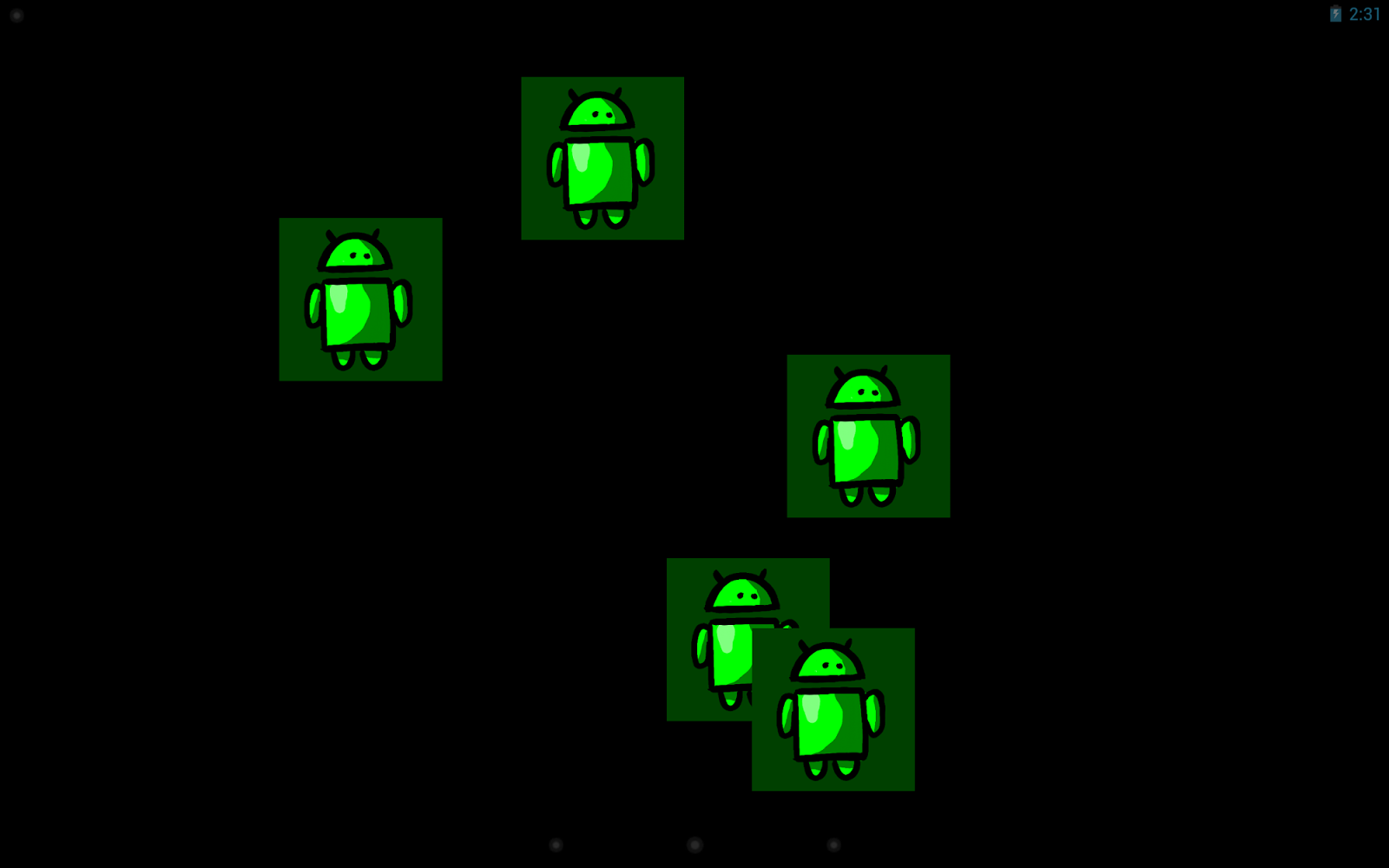
Figure 2. Will one of them hit the corner?
public class BouncerDaydream extends DreamService {
    @Override
    public void onDreamingStarted() {
        super.onDreamingStarted();

        // Our content view will take care of animating its children.
        final Bouncer bouncer = new Bouncer(this);
        bouncer.setLayoutParams(new
            ViewGroup.LayoutParams(MATCH_PARENT, MATCH_PARENT));
        bouncer.setSpeed(200); // pixels/sec

        // Add some views that will be bounced around.
        // Here I'm using ImageViews but they could be any kind of
        // View or ViewGroup, constructed in Java or inflated from
        // resources.
        for (int i=0; i<5; i++) {
            final FrameLayout.LayoutParams lp
                = new FrameLayout.LayoutParams(WRAP_CONTENT, WRAP_CONTENT);
            final ImageView image = new ImageView(this);
            image.setImageResource(R.drawable.android);
            image.setBackgroundColor(0xFF004000);
            bouncer.addView(image, lp);
        }

        setContentView(bouncer);
    }
}

public class Bouncer extends FrameLayout implements TimeAnimator.TimeListener {
    private float mMaxSpeed;
    private final TimeAnimator mAnimator;
    private int mWidth, mHeight;

    public Bouncer(Context context) {
        this(context, null);
    }

    public Bouncer(Context context, AttributeSet attrs) {
        this(context, attrs, 0);
    }

    public Bouncer(Context context, AttributeSet attrs, int flags) {
        super(context, attrs, flags);
        mAnimator = new TimeAnimator();
        mAnimator.setTimeListener(this);
    }

    /**
     * Start the bouncing as soon as we’re on screen.
     */
    @Override
    public void onAttachedToWindow() {
        super.onAttachedToWindow();
        mAnimator.start();
    }

    /**
     * Stop animations when the view hierarchy is torn down.
     */
    @Override
    public void onDetachedFromWindow() {
        mAnimator.cancel();
        super.onDetachedFromWindow();
    }

    /**
     * Whenever a view is added, place it randomly.
     */
    @Override
    public void addView(View v, ViewGroup.LayoutParams lp) {
        super.addView(v, lp);
        setupView(v);
    }

    /**
     * Reposition all children when the container size changes.
     */
    @Override
    protected void onSizeChanged (int w, int h, int oldw, int oldh) {
        super.onSizeChanged(w, h, oldw, oldh);
        mWidth = w;
        mHeight = h;
        for (int i=0; i<getChildCount(); i++) {
            setupView(getChildAt(i));
        }
    }

    /**
     * Bouncing view setup: random placement, random velocity.
     */
    private void setupView(View v) {
        final PointF p = new PointF();
        final float a = (float) (Math.random()*360);
        p.x = mMaxSpeed * (float)(Math.cos(a));
        p.y = mMaxSpeed * (float)(Math.sin(a));
        v.setTag(p);
        v.setX((float) (Math.random() * (mWidth - v.getWidth())));
        v.setY((float) (Math.random() * (mHeight - v.getHeight())));
    }

    /**
     * Every TimeAnimator frame, nudge each bouncing view along.
     */
    public void onTimeUpdate(TimeAnimator animation, long elapsed, long dt_ms) {
        final float dt = dt_ms / 1000f; // seconds
        for (int i=0; i<getChildCount(); i++) {
            final View view = getChildAt(i);
            final PointF v = (PointF) view.getTag();

            // step view for velocity * time
            view.setX(view.getX() + v.x * dt);
            view.setY(view.getY() + v.y * dt);

            // handle reflections
            final float l = view.getX();
            final float t = view.getY();
            final float r = l + view.getWidth();
            final float b = t + view.getHeight();
            boolean flipX = false, flipY = false;
            if (r > mWidth) {
                view.setX(view.getX() - 2 * (r - mWidth));
                flipX = true;
            } else if (l < 0) {
                view.setX(-l);
                flipX = true;
            }
            if (b > mHeight) {
                view.setY(view.getY() - 2 * (b - mHeight));
                flipY = true;
            } else if (t < 0) {
                view.setY(-t);
                flipY = true;
            }
            if (flipX) v.x *= -1;
            if (flipY) v.y *= -1;
        }
    }

    public void setSpeed(float s) {
        mMaxSpeed = s;
    }
}
This example code is handy for anything you want to show the user without burning it into the display (like a simple graphic or an error message), and it also makes a great starting point for more complex Daydream projects.
A few more idle thoughts
- First, do no harm: Daydream is meant to run when a device is charging. However, if the Daydream consumes too much CPU, charging might happen very slowly or not at all! The system will stop your Daydream if it detects that the device is not charging, so make sure your code leaves enough power to charge the battery in a reasonable amount of time.
- Respect the lockscreen: Daydream runs on top of the secure keyguard, which means that if you might be showing sensitive content, you need to give the user tools to control that content. For example, Photo Table and Photo Frame allow the user to select the albums from which photos will be displayed (avoiding embarrassing slideshows).
- Screen brightness: Think about where you expect your Daydream to be used and adjust the screen brightness accordingly using
setScreenBright() and possibly even using darker or brighter colors as necessary. A bedside clock will need to be dimmer than a desk clock; if you expect your Daydream to serve both purposes you'll need to give the user a choice.
- To hide the status bar or not: Many users will need instant access to the battery level and time of day, so you should avoid using
setFullscreen(), particularly if your Daydream is more informational than artistic. Daydream will start with the status bar in “lights out” mode (View.SYSTEM_UI_FLAG_LOW_PROFILE), where it’s quite unobtrusive but still shows the clock and charge status.
- When to use settings: In general, you have a little latitude for adding extra knobs and dials to Daydream settings. After all, this is a personalization feature, so users should be encouraged to tweak things until they feel at home. Sometimes, though, a more compelling experience can come from taking an artistic stand: giving the user a choice from a small number of polished, beautiful configurations (rather than providing all the controls of a commercial airline cockpit).
- There can be more than one: If you discover that your settings allow the user to pick between a few radically different display modes, consider splitting your Daydream into multiple DreamService implementations. For example, the photo gallery in Android 4.2 provides both the Photo Table and Photo Frame Daydreams.
- Use an Activity for development: Most Android development tools are optimized for developing and debugging conventional Android apps; since
DreamService and Activity are so similar, it can be useful to create a testing Activity that hosts the same content view as your DreamService. This way you can launch and test your code easily from your IDE as if it were any other Android project.
OK, that’s enough for now; you have the tools to go build Daydream support into your apps. Have fun with it — if you do, your users will have fun too. Oh, and when you upload your shiny new APK to Google Play, be sure to add a note to your app’s description so that users searching for Daydreams can discover it.
Further reading and samples
- API docs for DreamService
- Sample code: BouncerDaydream, complete project for the code snippets in this post
- Sample code: WebView, a Daydream that shows an HTML page
- Sample code: Colors, a Daydream that demonstrates OpenGL ES 2.0 and TextureView