Friday, February 22, 2013
AMD Catalyst Drivers ATI Radeon HD 7000, HD 6000 and HD 5000 Series

Thursday, February 21, 2013
First Exclusive Video Games Run on PS 4
Label:
PS 4 Specific,
ps 4 games,
PS 4 news

For every game lover, Sony PlayStation is definitely a good choice for home entertainment. Sony PlayStation started in 1994 from the first generation. Games released by Sony like Toshinden, Twisted Metal, Warhawk, Philosoma, Wipeout and Ridge Racers were quite popular at that time. Now Sony just announced PlayStation 4. But Sony didn't show what PlayStation will be like, we only get to know some of its new features. As for the specific of PlayStation 4, some tech site has leaked, you can read to check at Technabob
Since games on PlayStation 3 are not compatible with PlayStation 4. Unless you play them through Gaikai. Let's get to know what games will be first launched on PlayStation 4.
1 DIABLO Ⅲ

DIABLO Ⅲ is the sequel of action role-playing hack and slash video game DIABLO 2.The story happens in a dark evil world after 20 years from DIABLO 2. Players can choose one among five occupations. Every occupation gets the unique magic power and skills. Players will get rich option in the settings, experience the epic plot, challenge numberless evils to gain experience and power. Thus it can help to get surprising stuff with magic power.
2 Destiny

Destiny is a first person shooter game which developed by Bungie. It happened in an unknown city in the future after 700 years. A n Alien spacecraft stay in the sky like the second moon. Nobody knows when it comes and where it comes from. People have to figure out why them come here in case their civilization was damaged by these the alien。
3 Killzone

Killzone is a PlayStation-exclusive first-person shooter game. This games happened in the future world. At that time, there are two groups among human beings, militarism radical and the conservatives. They often fight with each other. The game sets background in the fight between individual countries Helghast and Special Forces Vekta in the republic of cosmos. Helghast wanted to rule the world. As a member of ISA, you have to try your best to stop them.
4 Knack

Knack is whimsical in the truest sense, casting you as the eponymous creature in a brilliant cartoon world of vivid colors and magical powers. Knack, the title character, is a creature forged from ancient relics combined to form a consciousness. A scientist called the Doctor is behind it all; unknowing or otherwise, his actions give Knack mystical powers. For example, Knack can incorporate relics that he finds to gain new powers--fire, ice, metal, and the like--and transform his body.
5 Deep Down
5 Deep Down
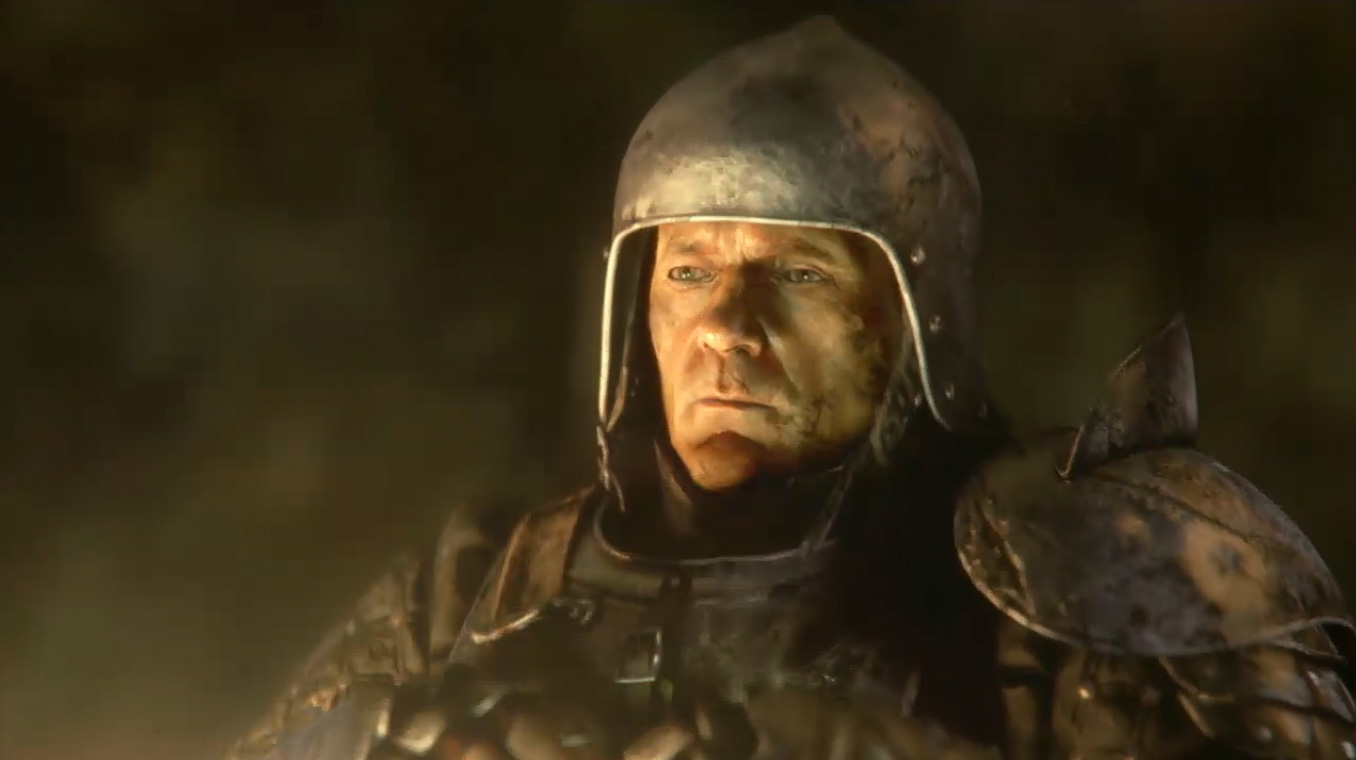
The plot is simple. some people with swords and bows fight a fire-breathing dragon.
6 Watch Dog
6 Watch Dog

Watch Dogs is an upcoming open world action-adventure video game developed by Ubisoft Montreal. Players can hack any electronic devices to achieve goals.The game is set in an alternate reality version of Chicago. It featured a supercomputer known as a "CtOS" which controls almost every piece of technology in the city and contains information on all the city's residents and activities which can be used for various purposes. The figure Aiden Pearce which was a highly skilled hacker seems to change this.
7 The witness

The Witness is an upcoming 3D puzzle video game by Jonathan Blow. It sets background in a uninhabited island. Throughout the island are blue panels that players can interact with; those seen in the demonstration were primarily mazes, requiring players to draw a line from a starting point to a finish point. Other panels showed more complex mazes to be completed. Only you finished this, you will find mystery behind the uninhabited island.
8 Drive Club
8 Drive Club

Drive Club means to let players to participate in the game in time and experience various challenge. Players will watch or join the drive race in the first person. This Game focus on the club team racing like in the real world. Compared with traditional racing games, Drive Club is more like a social game. Social group activity is another key point.Players will join the race for his club and get reward for this.
9 Infamous second son

Delsin Rowe is the main role in this game. He discovers that he suddenly has the ability to direct after rescuing occupants from a fiery bus wreck. The word is controlled by DUP organization which created to ensure there is never a repeat of the catastrophic events of Empire City and New Marais.. The player has to control the role to fight with DUP organization. Delsin Rowe has been treated as bio-terrorist get rip of DUP's control. As you play Second Son, you’ll explore lots of Seattle’s familiar landmarks.
10 The Witcher 3: Wild Hunt
10 The Witcher 3: Wild Hunt

The Witcher 3: Wild Hunt is an upcoming action role-playing video game currently being developed by CD Projekt RED and officially announced on February 5. The 《Witcher 3: Wild Hunt》 is the third edition for 《The Witcher》 series. And it's also the final edition. This game is based on book series of the same name by Polish author Andrzej Sapkowski. The Witcher 3 is set "In an open world 30 times larger" than the previous games, featuring the return of protagonist Geralt.
iStunt 2 v1.0.7 [In-app Billing Cracked] Apk Android


Get ready to hit the slopes in the most extreme snowboarding game on the Google Play Store!
Escape deadly buzz saws, keep you balance through gravity shifts and speed boosts, grind your way to victory in this fast paced and insanely addictive snowboarding game!
REVIEWS:
"The sense of being just enough in control is cool, and adds to the overall thrill ride element of iStunt 2." - IGN
"Pulling off a twisting move, a couple of grabs, and tilting just right, and just in time, for a perfect landing is what makes iStunt 2 a blast." - PocketGamer
"iStunt 2 is full of clever and surprising levels that remain exhilerating all the way through. iStunt 2 is a stunner." - SlideToPlay
KEY FEATURES:
★ Stunning HD graphics!
★ Fast paced gaming with perfectly balanced tilt controls!
★ 88 insane levels + more levels added regularly to keep all your extreme snowboarding needs satisfied!
★ In-game store with cool unique items!
★ Open Feint integration and leaderboards - show you're friends who's the stunt king in these deadly slopes!
Click Here To Download
Direct Download Link - Direct Download Link
Wednesday, February 20, 2013
Get to Know About Android Screen Resolution

You can imagine that if a 3.5 inch screen and a 4.7 inch screen get the same resolution 480x800, it's sure that the 3.5 inch screen will have better display effect while we can see the small grid caused by square in the 4.7 inch screen.
I once use Dopod 565 which released in 2004. It's early smartphone that time. It gets resolution in 176x220, this kind of resolution is described as QVGA.
VGA means resolution is 480x640. QVGA 240x320 resolution is commonly used for a long time after QVGA. QVGA(for it's only one quarter of VGA, so named QVGA ) is widely used by Nokia. Chinese named it as Q screen for those QVGA screen resolution.
Nokia N series handset all take QVGA resolution screen, like NOKIA N95/N96/N73/N78. They are all popular in the market. Blackberry 8 series also almost take QVGA resolution. At that time, most cellphone got a 2.6 inch screen. Of course except for Dopod D700, which is equipped with a 3.5 inch screen(it's a big screen at that time), it only gets 240x320 resolution. You can imagine how square show in this cellphone. Lower resolution doesn't show much difference for image display, but it does in words display.
In the development of VGA, we also meet other resolutions, like HVGA, HGVA is 320x480(for it's only half of VGA, so it named Half-VGA). HVGA resolution was also widely used, like iPhone which released in 2007. From the first generation to the third, iPhone took the 3.5 HVGA resolution screen. The early model for HTC also take HVGA resolution, like HTC G1/G2/G3.
As an extension of VGA, there are screens with 360x640 resolution.It once widely used by Nokia, like NOKIA 5230, flagship models N8 and E7 in early Nokia period. Before N8 was released, this resolution is everywhere it didn't catch up with trend.
There was a popular resolution named WVGA in 2011, it's 480x800 (for it's wider than VGA,so it gets this name). Many flagship models took this resolution like HTC G7(Desire)、HTC G10(DesireHD)、Samsung i9000(Galaxy S)、i9100(Galaxy S II). As smartphone develops, those models take the same resolution but different screen size, for example HTC G7 is 3.8' inch,Samsung i9000 is 4 inch,HTC G10 is 4.3' inch. So they surely go different in words display.
WVGA also gets a extended resolution named FWVGA, 480x854(the name comes from the taken 16:9 screen).Many Motorola model last year take this resolution,like Moto Droid、Milestone、Droid. Nokia N9 also take this resolution.
 |
| qHD resolution image |
iPhone 4 contributes to the extend of. iPhone 4 which was released in 2010 take the screen resolution to a higher degree (640x960, 3.5' inch). Now you can't tell from pixel grains, which is a big forward step for screen display.

If we say iPhone 4 lead a new improvement in smartphone screen resolution, then Android lead a smart phone HD screen resolution. We meet a lot 720P(1280x720) resolution smartphones in 2012 like Samsung Galaxy S3, HTC One X, Sony LT29i, LG Optimus 4X etc . But it seems that Android smartphone makers enjoy making HD resolution smartphone although it increases the cost. At this moment, we can see HD smartphone with 1080P which is coming, like OPPO Find 5, HTC One, HTC Droid DNA, HTC Butterfly, Huawei Ascend D2. It gets higher resolution than some 1366x768 PC. HD resolution screen really gives us more delicate images,words.video enjoyment.
What will the smartphone screen will be like in the future?
Call of Mini: Zombies v1.3 [Unlimited Money] Apk + Data Android
Label:
action,
arcade and action,
Games


The Smash-Hit #1 Action Game in the App Store is now on Android!
A SMALL TOWN INFECTED… UNDEAD ROAM the STREETS…
LOCK 'n' LOAD and come out GUNS BLAZING in HD GLORY!
A strange virus has taken hold in a small town; one after another, the town's people have succumbed, losing their appetite for food and gaining one for BRAINS.
A few brave men hold out against all hope, machine guns and rocket launchers their only aid. Will they survive another day?
That's up to YOU.
• Amazing 3D VISUALS
• Fast & furious RUN-AND-GUN ACTION
• Awesome WEAPONS in the ARMORY
8 immersive & expansive MAPS
16 powerful & unique WEAPONS
12 awesome AVATARS with special STRENGTHS
17 totally terrifying ENEMY ZOMBIE BREEDS
Click to Download
APK File
Direct Download Link - Direct Download Link
SD Data Files
Direct Download Link - Direct Download Link
Using Cryptography to Store Credentials Safely
Label:
Android 4.2,
security
Posted by Trevor Johns, Android Developer Relations team
Following our talk "Security and Privacy in Android Apps" at Google I/O last year, many people had specific questions about how to use cryptography in Android. Many of those revolved around which APIs to use for a specific purpose. Let's look at how to use cryptography to safely store user credentials, such as passwords and auth tokens, on local storage.
An anti-pattern
A common (but incorrect) pattern that we've recently become aware of is to use SecureRandom as a means of generating deterministic key material, which would then be used to encrypt local credential caches. Examples are not hard to find, such as here, here, here, and elsewhere.
In this pattern, rather than storing an encryption key directly as a string inside an APK, the code uses a proxy string to generate the key instead — similar to a passphrase. This essentially obfuscates the key so that it's not readily visible to attackers. However, a skilled attacker would be able to easily see around this strategy. We don't recommend it.
The fact is, Android's existing security model already provides plenty of protection for this kind of data. User credentials should be stored with the MODE_PRIVATE flag set and stored in internal storage, rather than on an SD card, since permissions aren't enforced on external storage. Combined with device encryption, this provides protection from most types of attacks targeting credentials.
However, there's another problem with using SecureRandom in the way described above. Starting with Android 4.2, the default SecureRandom provider is OpenSSL, and a developer can no longer override SecureRandom’s internal state. Consider the following code:
  SecureRandom secureRandom = new SecureRandom();
  byte[] b = new byte[] { (byte) 1 };
  secureRandom.setSeed(b);
  // Prior to Android 4.2, the next line would always return the same number!
  System.out.println(secureRandom.nextInt());
The old Bouncy Castle-based implementation allowed overriding the internally generated, /dev/urandom based key for each SecureRandom instance. Developers which attempted to explicitly seed the random number generator would find that their seed replaces, not supplements, the existing seed (contrary to the reference implementation’s documentation). Under OpenSSL, this error-prone behavior is no longer possible.
Unfortunately, applications who relied on the old behavior will find that the output from SecureRandom changes randomly every time their application starts up. (This is actually a very desirable trait for a random number generator!) Attempting to obfuscate encryption keys in this manner will no longer work.
The right way
A more reasonable approach is simply to generate a truly random AES key when an application is first launched:
public static SecretKey generateKey() throws NoSuchAlgorithmException {
    // Generate a 256-bit key
    final int outputKeyLength = 256;

    SecureRandom secureRandom = new SecureRandom();
    // Do *not* seed secureRandom! Automatically seeded from system entropy.
    KeyGenerator keyGenerator = KeyGenerator.getInstance("AES");
    keyGenerator.init(outputKeyLength, secureRandom);
    SecretKey key = keyGenerator.generateKey();
    return key;
}
Note that the security of this approach relies on safeguarding the generated key, which is is predicated on the security of the internal storage. Leaving the target file unencrypted (but set to MODE_PRIVATE) would provide similar security.
Even more security
If your app needs additional encryption, a recommended approach is to require a passphase or PIN to access your application. This passphrase could be fed into PBKDF2 to generate the encryption key. (PBKDF2 is a commonly used algorithm for deriving key material from a passphrase, using a technique known as "key stretching".) Android provides an implementation of this algorithm inside SecretKeyFactory as PBKDF2WithHmacSHA1:
public static SecretKey generateKey(char[] passphraseOrPin, byte[] salt) throws NoSuchAlgorithmException, InvalidKeySpecException {
    // Number of PBKDF2 hardening rounds to use. Larger values increase
    // computation time. You should select a value that causes computation
    // to take >100ms.
    final int iterations = 1000;

    // Generate a 256-bit key
    final int outputKeyLength = 256;

    SecretKeyFactory secretKeyFactory = SecretKeyFactory.getInstance("PBKDF2WithHmacSHA1");
    KeySpec keySpec = new PBEKeySpec(passphraseOrPin, salt, iterations, outputKeyLength);
    SecretKey secretKey = secretKeyFactory.generateSecret(keySpec);
    return secretKey;
}
The salt should be a random string, again generated using SecureRandom and persisted on internal storage alongside any encrypted data. This is important to mitigate the risk of attackers using a rainbow table to precompute password hashes.
Check your apps for proper use of SecureRandom
As mentioned above and in the New Security Features in Jelly Bean, the default implementation of SecureRandom is changed in Android 4.2. Using it to deterministically generate keys is no longer possible.
If you're one of the developers who's been generating keys the wrong way, we recommend upgrading your app today to prevent subtle problems as more users upgrade to devices running Android 4.2 or later.

Tuesday, February 19, 2013
Move your Android Apps to Win 8 PC

We have met win 8 in October 26,2012. I tried several days to know how to operate it, you know it drop the start menu feature. But I like Windows UI style, it's a real eye-popper! Except for that, the windows app store can't provide enough apps for users unlike Android which Google Play Store provides thousand of apps.Though windows app store is gradually developing, apps still don't meet needs. Have you ever thought play Android apps on win 8? It may seems impossible, but some tech guy did develop such tool to realize this. If you are a tech fan, don't hesitate to take some time to play with this.
This tool named BlueStacks which can run on Windows 8 and Surface Pro, not on surface RT right now. And it is not difficult to use. As it first compatible with windows 7 for a long time, now there are tutorials on YouTube. You just need to go to http://www.bluestacks.com to download, install this app and follow the instructions to set up. Your win 8 PC will play the role of Android tablet.
Compared with installing apps directly on windows 8, BlueStacks app player may be a little convenient. But as the current situation of windows app store, it's still a good choice to have some fun. We wish windows app store provides us more apps as times goes. Then we don't need to use such tool.
Below is the official video from bluestacks about how to use BlueStack:
Subscribe to:
Posts (Atom)